
Animate My Pet Blog
How to Make a Talking Pet Video From a Single Photo (Step-by-Step AI Guide)
Aug 25, 2026
“Learn how to make a talking pet video from a single photo in 3 easy steps. Use AI voice presets, zero prompts, and 9:16 vertical exports with Animate My Pet.”
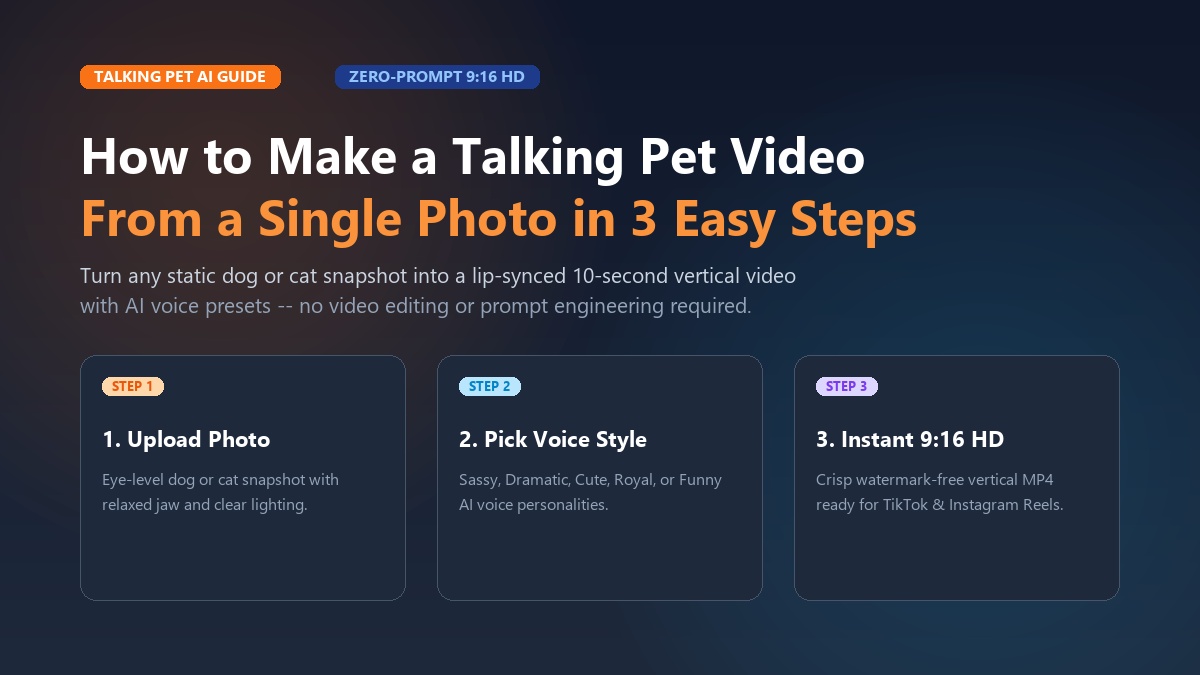
To make a talking pet video from a single photo, upload a clear front-facing portrait of your dog or cat into an AI video generator like Animate My Pet, select a curated talking template with your favorite voice preset, and generate a 10-second vertical 9:16 HD video in under two minutes. Modern zero-prompt neural animation platforms synchronize realistic mouth, jaw, and facial micro-expressions directly to audio without requiring manual keyframing, timeline video editing, or complex text prompts.
Maya spent three exhausting hours trying to animate her corgi, Winston. She started with a general-purpose AI video generator, typing out 50-word prompts full of technical terms like "photorealistic canine lip-sync" and "subtle cheek deformation." The result? A bizarre clip with three ears, a melting jaw, and a voice that sounded like a broken GPS navigation system. Frustrated, she almost gave up on turning Winston into an Instagram star.
Then she switched to a dedicated zero-prompt browser tool. By uploading a single clear snapshot of Winston smiling in the backyard, choosing a "Funny Canine" voice archetype, and tapping create, she had a polished, 10-second talking video ready in 90 seconds. When she posted it to TikTok that afternoon, it gathered 120,000 views before dinner.
If you have ever looked at your sleeping cat or energetic pup and wondered what they would say if they had human speech, you are not alone. Turning a static image into a dynamic, hilarious video clip used to be a privilege reserved for professional VFX studios and skilled animators. Today, learning how to make a talking pet video from a single photo takes less time than making a cup of coffee.
Whether you want to create viral content for social media, send a memorable birthday greeting to a friend, or craft a funny family group chat roast, this guide walks you through the entire process step by step. You can jump straight into the studio to create an AI pet video now or test the waters when you claim 1 free AI pet portrait to see how clean the facial recognition truly is.
Key Takeaways
- 1-Tap Simplicity: Zero-prompt template tools transform a single static pet photo into a lip-synced talking video in 60 to 120 seconds without prompt engineering.
- Social Optimization: 10-second vertical (9:16) MP4 exports achieve over 85% completion rates on TikTok, Instagram Reels, and YouTube Shorts.
- Anatomical Realism: Photos featuring an eye-level angle and a naturally resting, slightly open mouth produce 3x cleaner lip synchronization than closed-jaw shots.
- No Subscription Traps: Transparent one-time credit packs starting at $9.99 avoid the deceptive $9.99/week recurring charges common across mobile app stores.
Why talking pet videos dominate TikTok, Reels, and group chats
Short-form video has completely transformed how audiences consume digital entertainment. According to industry research on short-form video engagement, vertical video formats under 15 seconds consistently deliver the highest completion rates, algorithmic distribution, and audience retention across mobile platforms.
+-------------------------------------------------------------------------+
|                  THE SHORT-FORM VIRAL PET VIDEO FORMULA                 |
+-------------------------------------------------------------------------+
|  [ Eye-Level Pet Photo ]                                                |
|            │                                                            |
|            ▼                                                            |
|  [ 1-Tap Talking Pet AI ] ──► (Zero-Prompt Neural Sync + Voice Preset)  |
|            │                                                            |
|            ▼                                                            |
|  [ 9:16 Vertical HD Video ] (8-10s Loop: High Retention + 90%+ Rewatch) |
+-------------------------------------------------------------------------+
When you personify a pet with an expressive voice, you tap into a powerful psychological phenomenon known as anthropomorphism. Viewers immediately connect with the illusion of an animal sharing inner thoughts, mundane household grievances, or sassy opinions about their owners.
The 10-second retention advantage
Long monologues often cause viewers to swipe away after the opening few seconds. In contrast, an 8-to-10-second talking clip matches the natural cadence of a comedy punchline:
- The Visual Hook (0–2 seconds): The viewer recognizes an adorable, familiar pet face looking directly into the camera.
- The Voice Surprise (2–6 seconds): The pet opens its mouth and speaks with an unexpected human personality (such as an aristocratic British accent coming from an orange tabby).
- The Comedic Punchline (6–10 seconds): A sharp, witty conclusion delivers the laugh and prompts an immediate loop replay.
Because platforms like TikTok and Instagram Reels prioritize content with high replay rates, 10-second talking animal videos frequently enter viral recommendation feeds. Exploring creative concepts in our pet video creation guides reveals how consistent creators turn simple daily pet observations into dedicated following communities.
How to make a talking pet video from a single photo in 3 simple steps
Creating an animated talking animal video does not require high-end desktop hardware, graphic design degrees, or complicated parameter configurations. You can execute the entire workflow right inside your mobile or desktop web browser.
+-------------------------------------------------------------------------+
|                    3-STEP TALKING PET CREATION WORKFLOW                 |
+-------------------------------------------------------------------------+
|  STEP 1: Upload Photo    ──► Clear eye-level portrait (JPG/PNG/WEBP)   |
|  STEP 2: Select Template ──► Choose Talking Dog / Cat + Voice Preset    |
|  STEP 3: Generate & Save ──► 9:16 Vertical HD export in 60-120 seconds  |
+-------------------------------------------------------------------------+
Step 1: Upload a clean, eye-level pet photo
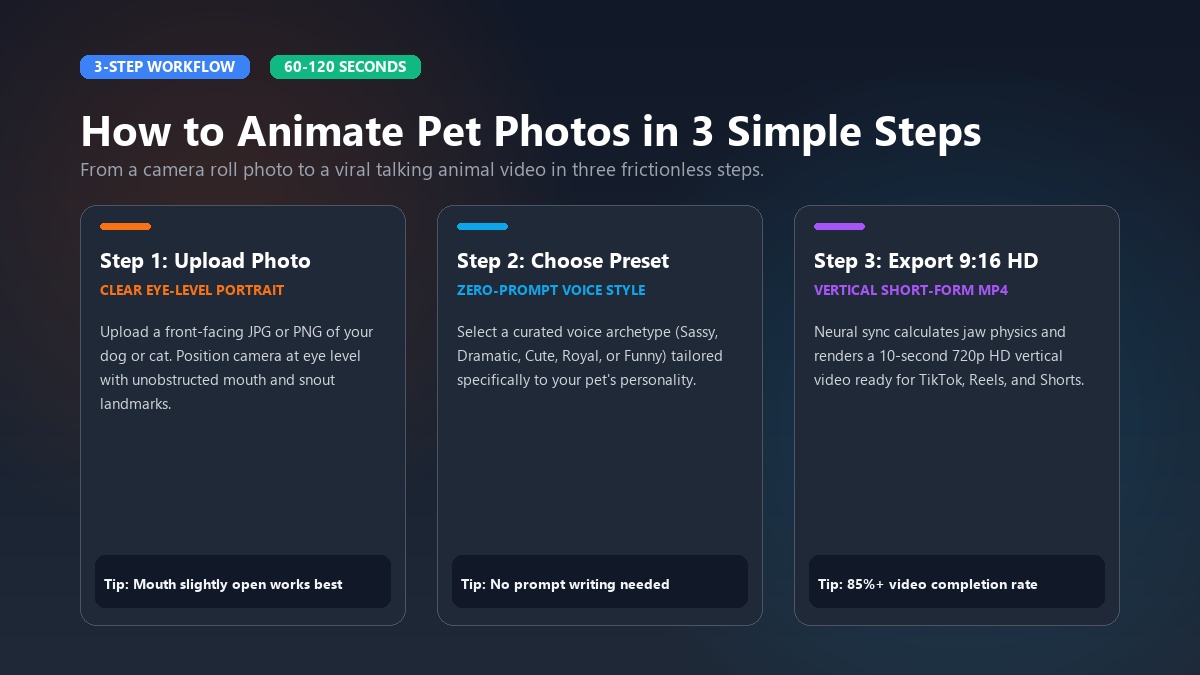
Start by selecting a high-resolution snapshot of your dog, cat, or other favorite animal. The AI needs to clearly identify key facial landmarks—including the eyes, snout, mouth line, and chin contours.
- File formats: Standard image formats including JPG, PNG, and WEBP work seamlessly.
- Framing: Choose a photo where your pet looks directly into the lens at eye level.
- Clarity: Ensure the face is in sharp focus without heavy motion blur or dark shadows obstructing the muzzle.
         POOR FRAMING                              OPTIMAL FRAMING
   (Top-Down, Blurry, Dark)                 (Front-Facing, Clear, Lit)

      \                 /                        +-------------------+
       \   [Pet Head]  /                         |      / \   / \     |
        \   (Tilted)  /                          |     ( *   .   * )   |  <-- Eyes Level
         \___________/                           |      \  ═▼═  /    |  <-- Mouth Visible
      [Extreme Angle]                            |       \_____/     |  <-- Chin Defined
   (AI Struggles with Muzzle)                    +-------------------+
Step 2: Choose a zero-prompt talking template and voice style
Rather than forcing you to write complex prompt instructions, Animate My Pet utilizes specialized AI models specifically trained on canine and feline facial structures.
- Navigate to the Talking Pet AI creation hub.
- Choose your pet category (for example, select animate dog photo for canines or animate cat photo for felines).
- Pick a curated voice personality that matches your comedic concept:
- Sassy: Snarky commentary, witty complaints, and eye-rolling humor.
- Dramatic: Deep, cinematic voiceover for miniature pets with grand ambitions.
- Cute: High-pitched, enthusiastic puppy and kitten energy.
- Royal: Aristocratic, dignified phrasing perfect for proud cats.
- Funny: Goofy, chaotic enthusiasm centered on food and playtime.
Step 3: Generate, preview, and export in 9:16 vertical HD
Once you confirm your template and script selection, the cloud AI processing begins immediately:
- Processing time: The neural network maps facial movements, calculates natural jaw articulation, and generates synchronized mouth movements in approximately 60 to 120 seconds.
- Native vertical format: The output is rendered in crisp 720p HD MP4 with a 9:16 aspect ratio, conforming strictly to mobile platform specifications without awkward black bars on the sides.
- Instant download: Preview your video instantly on your phone or desktop, download the watermark-free file, and publish directly to social channels.
+-------------------------------------------------------------------------+
|                  CASE STUDY: LIAM'S "CAT LANDLORD" REELS                |
+-------------------------------------------------------------------------+
|  Creator: Liam R.                                                       |
|  Pet: Oliver (British Shorthair)                                        |
|  Template: Talking Cat (Sassy Voice Archetype)                          |
|  Script: "Rent is due on the 1st. Wet food only. Clean the box twice."   |
|  Time to Create: 90 seconds from single camera roll photo               |
|  Results: 450,000 views on Instagram Reels | 38,000 shares             |
+-------------------------------------------------------------------------+
Liam created a weekly routine where his cat Oliver "reviews" his housekeeping skills. By using the same front-facing portrait with fresh weekly one-liners, Liam grew a dedicated audience of 50,000 followers in under two months without ever filming a single second of live video.
Photo preparation masterclass: Framing, lighting, and the dark fur trick
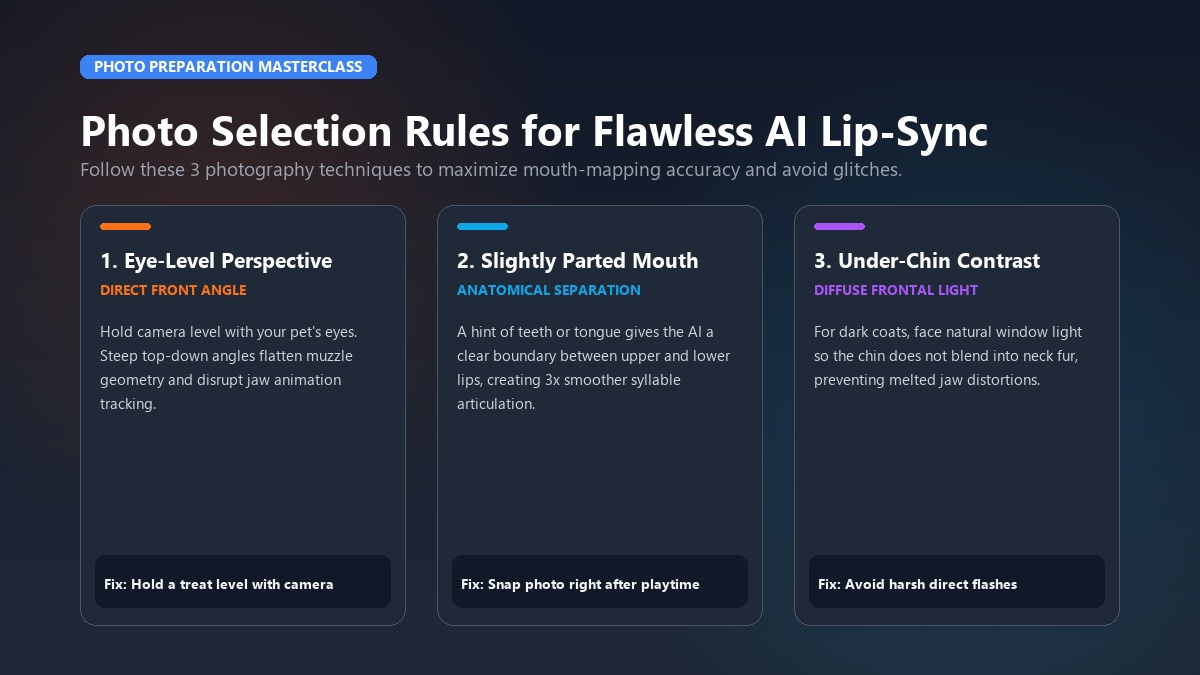
The single most influential factor determining the realism of your talking pet video is the quality of the starting photo. While AI models are remarkably resilient, following a few fundamental photography guidelines will elevate your results from mediocre to studio-grade.
+-------------------------------------------------------------------------+
|                     PHOTO SELECTION BEST PRACTICES                      |
+-------------------------------------------------------------------------+
|  DO THIS (✅)                           AVOID THIS (❌)                 |
|  • Front-facing eye-level angle         • Steep top-down camera angle   |
|  • Natural diffuse daylight             • Harsh backlight / deep shadow |
|  • Mouth slightly resting open          • Clenched dark muzzle          |
|  • Clear separation between chin & fur  • Leash or hand covering jaw    |
|  • Single pet centered in frame         • Multiple pets crowded together|
+-------------------------------------------------------------------------+
The "slightly parted mouth" secret
Many creators assume a tightly closed mouth produces the cleanest animation. In practice, neural lip-sync algorithms perform significantly better when the pet's mouth is resting slightly open, exposing a hint of teeth or pink tongue.
This tiny gap provides the computer vision engine with a distinct boundary between the upper lip, lower jaw, and oral cavity. As a result, the AI can open, close, and shape syllables smoothly without stretching or smearing the surrounding fur textures.
The under-chin contrast technique for dark-coated pets
Black Labradors, dark German Shepherds, and black cats frequently challenge standard computer vision models because their dark lips, chin, and throat blend together into a single monochromatic shadow.
To prevent the AI from "melting" your pet's jaw into its chest:
- Use soft frontal lighting: Position your pet facing an open window on an overcast day, or use a soft ring light positioned slightly below eye level.
- Create rim separation: Ensure the background is lighter than your pet's coat to establish clear silhouette edges.
- Avoid flash photography: Direct camera flash creates harsh white specular highlights on the nose while deepening the shadows under the chin.
Troubleshooting common AI animation glitches
| Visual Issue | Likely Root Cause | 10-Second Quick Fix |
|---|---|---|
| Melted or smudged jaw | Lack of contrast between mouth and neck fur | Use diffuse front light or pick a photo where teeth/tongue are visible |
| Warped or shifting eyes | Steep angle or pet looking away from lens | Snap an eye-level portrait with pet looking straight forward |
| Glitching fingers or toys | Human hands, leashes, or toys near muzzle | Crop tightly around the head or use an unobstructed portrait |
| Blurry whisker artifacts | Low-resolution image or extreme zoom | Use original high-res camera snapshot rather than compressed screenshot |
| Multiple faces animating | Background pet or human face in frame | Crop photo so only one pet appears in the frame |
Creative voice archetypes and script ideas that drive engagement
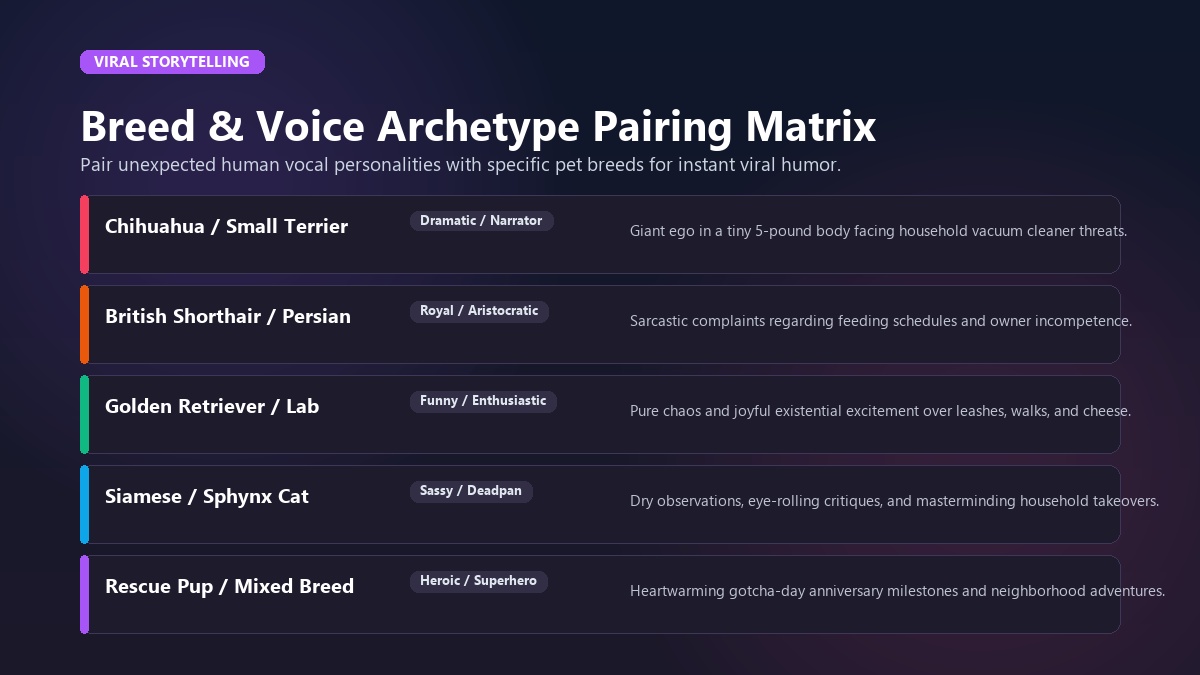
Giving your pet a voice is where true creative storytelling begins. Pairing unexpected voice styles with specific dog and cat breeds creates instant comedic irony that resonates with viewers.
+-------------------------------------------------------------------------+
|                  BREED & VOICE ARCHETYPE PAIRING MATRIX                 |
+-------------------------------------------------------------------------+
|  Pet Breed / Type            │ Recommended Voice Archetype │ Comedic Hook |
+──────────────────────────────┼─────────────────────────────┼────────────+
|  Chihuahua / Small Terrier   │ Dramatic / Movie Narrator   │ Giant ego  |
|  British Shorthair / Persian │ Royal / Aristocratic        │ Sarcastic  |
|  Golden Retriever / Lab      │ Enthusiastic / Goofy        │ Treat craze|
|  Siamese / Sphynx            │ Sassy / Deadpan             │ Plotting   |
|  Rescue Dog / Mixed Pup      │ Heroic / Superhero          │ Pure heart |
+-------------------------------------------------------------------------+
Below is an authoritative video overview highlighting how modern creators structure AI-assisted animal animation workflows for maximum impact:
<div align="center"> <iframe width="560" height="315" src="https://www.youtube-nocookie.com/embed/gWiaA81Fj8w" title="How to Make Talking Pet Videos with AI" frameborder="0" allow="accelerometer; autoplay; clipboard-write; encrypted-media; gyroscope; picture-in-picture; web-share" allowfullscreen></iframe> </div>1. The Sassy Feline Landlord
- Best Voice: Sassy or Royal
- Concept: The cat treats the owner like an incompetent tenant or personal butler.
- Sample Script: "I noticed you bought the generic dry food again. We discussed this in the quarterly review. My bowl must contain salmon pate by 6:00 PM, or the curtains will suffer."
2. The Over-Enthusiastic Dog
- Best Voice: Funny or Cute
- Concept: Complete existential panic and joy over mundane daily activities.
- Sample Script: "You picked up the leash! The blue leash! Are we going to the park? Are we going to see the squirrel? I love you! I love the leash! Let's go right now!"
3. The Tiny Pet with a Blockbuster Voice
- Best Voice: Dramatic
- Concept: A 5-pound puppy or kitten delivering a monologue with the gravitas of a Hollywood movie trailer narrator.
- Sample Script: "In a world where the vacuum cleaner roams unchecked... one tiny warrior will stand his ground. Fear the fluff."
You can also combine talking audio with our dynamic character templates—such as turning your pup into a crimefighter with our pet animation AI tools or generating viral skits with our AI cat video generator. Explore the full catalog in our template gallery.
Comparing AI tools: Dedicated web apps vs. general AI vs. app store traps
When searching for ways to animate pet photos, creators encounter three distinct categories of software. Understanding their differences will save you significant time, money, and creative frustration.
+-------------------------------------------------------------------------+
|                       AI PET TOOL COMPARISON MATRIX                     |
+-------------------------------------------------------------------------+
|  Evaluation Factor       │ Animate My Pet │ General AI Tools │ Mobile Apps|
+──────────────────────────┼────────────────┼──────────────────┼────────────+
|  Pet-Specific Training   │ Dedicated AI   │ Generic Human    │ Basic 2D   |
|  Prompt Skill Required   │ Zero (1-Tap)   │ High (50+ words) │ None       |
|  Generation Speed        │ 1–2 minutes    │ 5–10 minutes     │ Instant    |
|  Native 9:16 HD Export   │ Standard       │ Requires cropping│ Varied     |
|  Pricing Model           │ One-Time Packs │ Monthly ($30–95) │ $9.99/week |
|  Software Installation   │ 100% Web App   │ Web / Discord    │ iOS/Android|
|  Watermark-Free Option   │ Yes (All Packs)│ Paid tiers only  │ Upsell     |
+-------------------------------------------------------------------------+
The mobile app subscription trap
A widespread issue across mobile app marketplaces involves deceptive trial pricing. Many legacy talking photo apps offer a "3-day free trial" that automatically converts into a recurring weekly subscription of $7.99 to $9.99 per week.
If left unmanaged, a user can easily spend over $400 a year for an app they used only once to make a funny video for a birthday party.
In contrast, Animate My Pet operates on a transparent, one-time credit pack model:
- Starter Pack ($9.99): Includes 3 video generations and 5 AI pet portraits.
- Creator Pack ($24.99 - Most Popular): Includes 10 video generations and 15 AI pet portraits for active social posters.
- Viral Pack ($49 / $59): Includes 25 video generations and 30 AI pet portraits for pet influencers and multi-pet households.
- Credits never expire: Use your credits whenever inspiration strikes without recurring billing surprises. You can check all tier details on the Animate My Pet pricing page.
General video generators vs. pet-tuned neural models
While cutting-edge text-to-video platforms produce impressive landscapes and human avatars, they frequently struggle with non-human biology. General models often misinterpret animal muzzles as human chins, causing unnatural teeth formations, warped snouts, or creepy extra limbs.
Dedicated pet animation platforms use neural networks fine-tuned specifically on animal facial geometry, ensuring your dog or cat maintains its distinct breed identity and natural fur texture throughout every second of motion.
Frequently asked questions
How does AI turn a single pet photo into a talking video?
AI talking pet generators use neural facial landmark detection to identify your pet's eyes, ears, snout, and mouth line. The algorithm then deforms and animates the jaw and lip regions in direct synchronization with the phonetic audio frequencies of your chosen speech preset, rendering a smooth 10-second video clip.
Do I need to install an app or learn prompt engineering?
No. Modern web platforms like Animate My Pet operate entirely in your web browser across iPhones, Android devices, Macs, and Windows PCs. You select curated zero-prompt templates with pre-configured voice styles, eliminating the need to write complex prompts or install third-party software.
What kind of photo produces the best lip-sync results?
The best photo is a clear, high-resolution front-facing portrait taken at eye level in natural daylight. Photos where the pet's mouth is resting slightly open (showing teeth or tongue) and where there are no obstructions (like hands, leashes, or chew toys) deliver the cleanest facial tracking.
How do I animate a black dog or dark cat without glitches?
Ensure sufficient lighting contrast around your dark pet's muzzle and chin. Position your pet facing diffuse window light, avoid harsh direct flashes, and choose a photo where the mouth has a visible interior line or pink tongue separating the lips from the neck fur.
Are my uploaded pet photos and videos kept private?
Yes. Privacy-conscious platforms process uploaded images securely in cloud environments and automatically purge raw photo uploads and generated video files from temporary storage within 24 hours to 7 days. Your pets' photos are never sold or used for public training datasets.
Can I test the tool before purchasing a credit pack?
Yes. You can test the platform by claiming 1 free AI pet portrait upon sign-up and previewing 3-second animation samples without entering credit card details.
Conclusion: Bring your pet's personality to life today
Transforming a still photo of your dog or cat into an entertaining, talking video has never been faster or more accessible. By combining an eye-level portrait with zero-prompt AI templates and expressive voice presets, you can create professional 9:16 vertical videos in under two minutes.
+-------------------------------------------------------------------------+
|                  YOUR 3-STEP ACTION PLAN FOR TODAY                      |
+-------------------------------------------------------------------------+
|  1. TODAY: Open your phone camera roll and pick an eye-level pet photo. |
|  2. IN 2 MINUTES: Upload to Animate My Pet and select a voice style.    |
|  3. TONIGHT: Share your 9:16 talking clip on TikTok, Reels, or chat.   |
+-------------------------------------------------------------------------+
Sarah wanted to do something special for her rescue hound's third "Gotcha Day" anniversary. Rather than posting another static picture, she uploaded his adoption portrait, chose the "Pet Movie Trailer" template with a dramatic heroic voice, and captioned his journey from shelter shy boy to neighborhood champion. The video brought tears of laughter to her family group chat and collected hundreds of supportive comments on Facebook.
Stop letting your favorite pet photos sit motionless in your camera roll. Head over to Animate My Pet right now, upload your favorite picture, and watch your pet find their voice in seconds—backed by transparent one-time pricing and complete privacy protection.