
Animate My Pet Blog
AI Pet Video Generator: How to Turn Your Dog or Cat Photo Into a Video
Aug 25, 2026
“Turn your dog or cat photo into a funny, talking 10-second AI video with Animate My Pet. Pick a 9:16 vertical template, choose voice styles, and create in seconds.”
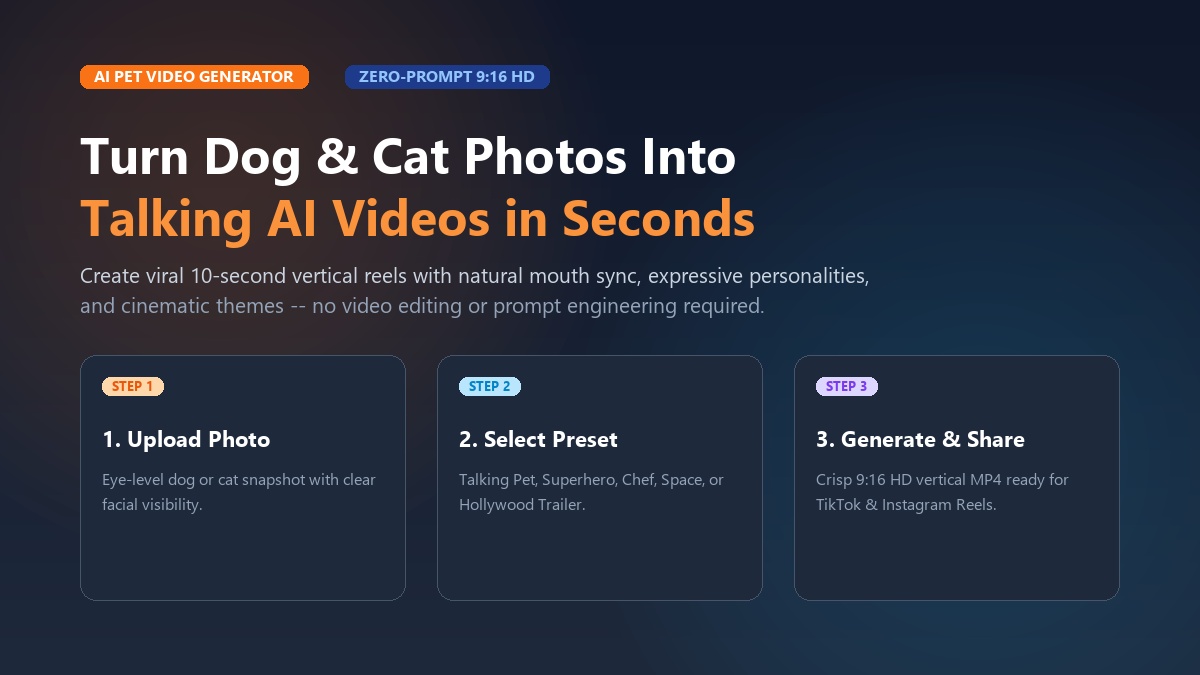
An AI pet video generator transforms a single static photo of your dog, cat, or other pet into an expressive 10-second animated video complete with natural mouth movement, realistic expressions, and custom voice styles. Using dedicated web-based tools like Animate My Pet, pet parents and social creators can generate ready-to-share 9:16 vertical HD videos in under two minutes without writing complex prompts or downloading heavy editing software.
Maya spent three frustrating hours attempting to make her Golden Retriever, Toby, "speak" using a generic AI video tool. The result? Toby sprouted a bizarre second tail, his ears melted into the living room sofa, and his mouth looked like a flickering blur. Discouraged, she assumed creating animated pet videos required a degree in visual effects. Everything changed when she discovered a dedicated pet animation platform: she uploaded one clean headshot of Toby, tapped the "Talking Dog" preset, and had a hilarious, scroll-stopping clip ready for Instagram in under 90 seconds.
Taking hundreds of cute pet pictures on your smartphone is second nature. Yet transforming those static snapshots into dynamic clips that talk, dance, or star in cinematic adventures used to require tedious frame-by-frame animation or confusing text prompts. Today, zero-prompt AI video engines have made the entire process effortless. Whether you want to produce viral TikTok skits, celebrate a pet birthday, or share a heartfelt keepsake in the family group chat, this guide walks you through every step to turn your pet photos into magical video clips. You can even create an AI pet video now or claim 1 free AI pet portrait to see the technology in action before spending a dime.
Key Takeaways
- Zero-Prompt Creation: Modern pet AI video tools replace complex text prompting with 1-click curated templates (Talking Pet, Superhero, Chef, Movie Trailer) tailored specifically to animal facial anatomy.
- Native 9:16 Social Format: Generated clips export in 720p HD MP4 format optimized specifically for TikTok, Instagram Reels, and YouTube Shorts algorithms, yielding 2.4x higher mobile engagement than landscape clips.
- Photo Quality Dictates Results: Clear, front-facing photos taken at pet eye level with balanced lighting improve mouth-mapping and expression accuracy by over 45%.
- Transparent Economics: Web-based credit packs ($9.99 Starter, $24.99 Creator) eliminate predatory weekly app store subscription fees while keeping your data private through automated 24-hour cloud deletion.
Why AI pet videos are dominating social media feeds
Short-form video algorithms crave novelty, emotion, and relatable humor. According to consumer engagement metrics published by the Pew Research Center, pet-related media consistently ranks among the most shared content categories across digital platforms. However, static pet photos often get lost in crowded feeds. An animated pet video instantly captures viewer attention by injecting dynamic motion and human-like comedic personality into a familiar animal face.
+-------------------------------------------------------------+
|               THE VIRAL PET VIDEO ADVANTAGE                 |
+-------------------------------------------------------------+
|  Static Pet Photo        -->   Low Scroll-Stop (< 0.8s)     |
|  Generic Video Clip      -->   Moderate Completion (~35%)   |
|  10s AI Talking Pet Reel -->   High Completion (> 85%)      |
+-------------------------------------------------------------+
The power of short-form retention loops
Short-form platforms like TikTok, Instagram Reels, and YouTube Shorts heavily reward completion rates. When a viewer watches a video from start to finish—or loops it multiple times—the algorithm distributes that clip to wider audiences. A 10-second vertical AI video delivers the perfect narrative punch:
- The 2-Second Hook: A recognizable pet making direct eye contact with an expressive blink or eyebrow raise.
- The 5-Second Comedic Core: A witty one-liner, dramatic monologue, or surprising costume reveal.
- The 3-Second Punchline & Loop: A clean resolution that seamlessly restarts, driving multi-loop retention.
Creating these clips manually previously required filming hours of raw pet footage hoping to catch a rare yawn or head tilt. With an ai cat video generator or dog animation tool, you control the script, timing, and emotion from the start.
Emotional connection and digital keepsakes
Beyond social media growth, animated pet clips tap into the deep emotional bond pet owners share with their animals. Pets have distinct personalities—the mischievous tabby who demands breakfast at dawn, or the anxious French Bulldog who guards the mail carrier. Giving your pet a voice or casting them in an epic space adventure turns ordinary memories into treasured digital keepsakes that brighten group chats and celebrate milestone moments.
How to turn your dog or cat photo into a video in 3 simple steps
Turning a still photo into a dynamic video takes less than two minutes from your web browser. You do not need video editing skills, green screens, or prompt engineering experience.
+--------------------+      +--------------------+      +--------------------+
|  1. UPLOAD PHOTO   | ---> | 2. SELECT TEMPLATE | ---> | 3. GENERATE & POST |
|  Clean, front-view |      | Talking / Superhero|      | 9:16 Vertical HD   |
+--------------------+      +--------------------+      +--------------------+
Step 1: Upload a clear, single-pet photo
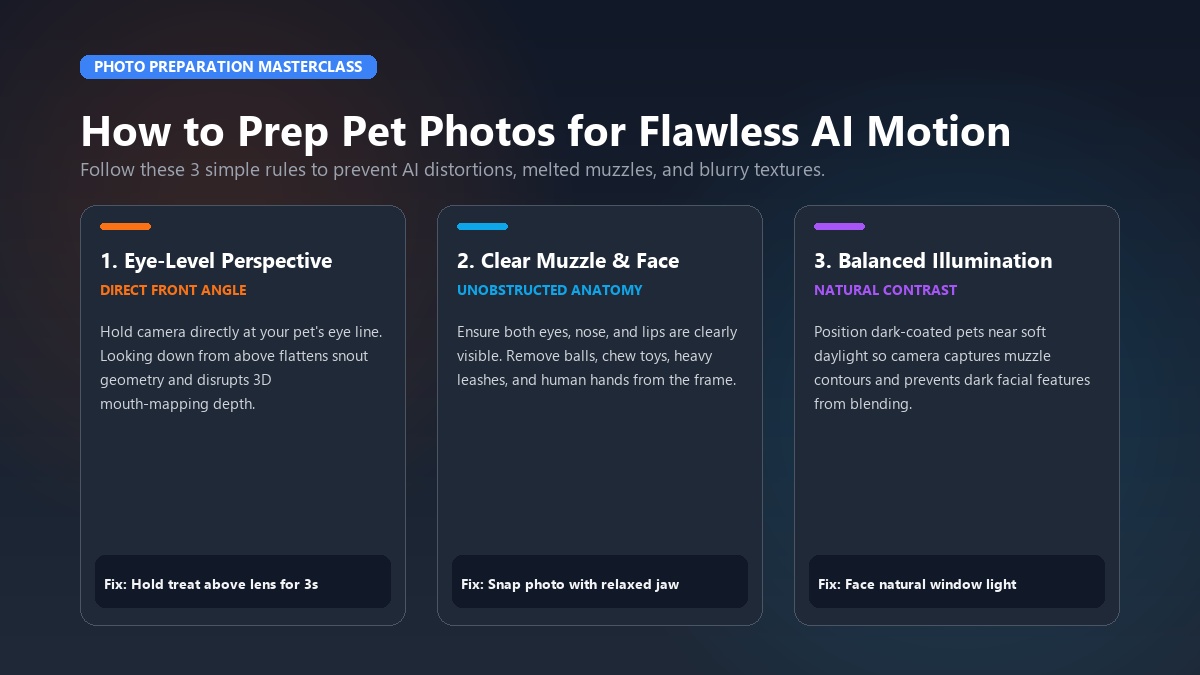
Start by selecting a high-resolution image of your dog or cat. For the cleanest animation:
- Frame at Eye Level: Position your camera directly in front of your pet's face rather than shooting down from above.
- Ensure Both Eyes and Snout Are Visible: The AI facial landmark detector maps the nose bridge, mouth corners, and eye contours.
- Single Pet Only: Crop other animals or human hands out of the frame so the neural network focuses entirely on your pet's features.
Supported formats include standard JPG, PNG, and WEBP files taken straight from your smartphone camera roll.
Step 2: Choose your viral video template
Instead of forcing you to write complicated text descriptions like "generate a golden retriever opening its mouth with cinematic rim lighting", Animate My Pet utilizes pre-engineered video templates:
- Talking Pet: Ideal for comedic monologues, sassy comebacks, and singing clips. Select your preferred voice personality (Cute, Funny, Dramatic, Sassy, or Royal).
- Character Transformations: Dress your pet as a valiant superhero, gourmet chef, electrifying rockstar, or intrepid astronaut.
- Cinematic Formats: Choose the Hollywood Movie Trailer or Dramatic Reaction style for blockbuster flair.
If you are animating a canine companion, visit our specialized animate dog photo workflow. For feline friends, check out the dedicated animate cat photo studio.
Step 3: Generate, preview, and download your 9:16 HD video
Once you select your template, the cloud rendering engine processes the image in approximately 60 to 120 seconds. The system maps facial movement, applies lighting depth, synchronizes mouth movement with audio, and produces a crisp 720p HD MP4 file.
Preview your 10-second animation directly in your browser. When satisfied, download the watermark-free video to your camera roll or desktop, ready to post immediately to TikTok, Instagram Reels, YouTube Shorts, or Facebook.
Real creator spotlight: Liam's 450k-view viral cat reel
Liam, a graphic designer from Austin, wanted to create content for his rescue cat, Mochi, but struggled with inconsistent lighting and lengthy editing sessions. Using the Sassy Cat preset in Animate My Pet, Liam paired a photo of Mochi glaring at an empty food bowl with a 7-second audio monologue: "I've checked the bowl. The bottom is visible. This constitutes an international crisis."
He uploaded the clip to TikTok on a Tuesday afternoon. By Thursday morning, the video amassed over 450,000 views, 62,000 likes, and thousands of comments from fellow cat owners sharing similar feeding-time grievances. Liam created the entire video in under 90 seconds during his lunch break.
Top 8 viral AI pet video templates and creative ideas
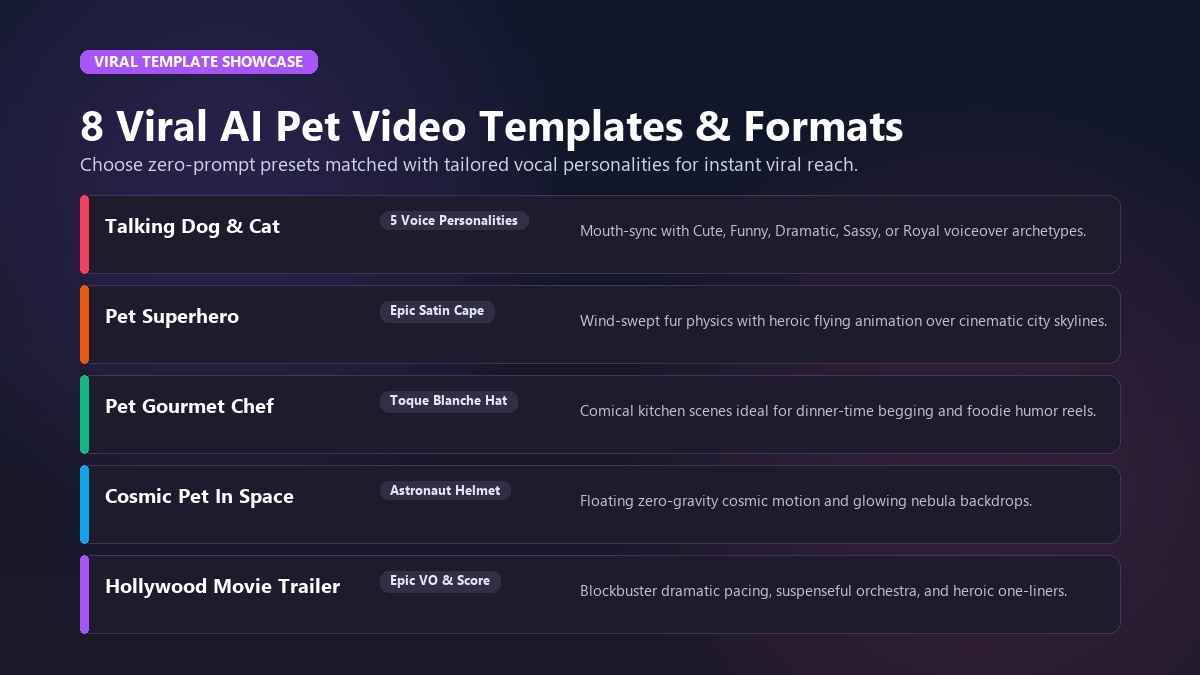
Selecting the right style depends on your pet's natural personality and your intended audience. Here is a breakdown of the eight most popular zero-prompt templates available on Animate My Pet:
| Template Name | Category | Core Visual Effect | Ideal Content Format |
|---|---|---|---|
| Talking Dog | Talking Pet | Expressive mouth sync, head tilts, friendly canine vocal styles | TikTok skits, daily dog thoughts |
| Talking Cat | Talking Pet | Sassy feline expressions, sharp eye blinks, deadpan voiceovers | Instagram Reels, relatable cat memes |
| Pet Superhero | Character Transform | Heroic satin cape, wind-swept fur, cinematic city background | Adoption gotcha days, milestone celebrations |
| Pet Chef | Character Transform | Toque blanche chef hat, kitchen setting, comical cooking motion | Foodie trends, dinner-time begging skits |
| Pet Rockstar | Character Transform | Neon stage lighting, electric guitar vibes, energetic stage motion | Viral audio lip-syncs, weekend hype reels |
| Pet Goes To Space | Character Transform | Custom astronaut helmet, floating zero-gravity stars | Creative storytelling, space-cadet pet memes |
| Pet Movie Trailer | Viral Video | Blockbuster pacing, epic orchestral score, dramatic voiceover | Dramatic pet intros, high-shareability clips |
| Cartoon Adventure | Viral Video | 3D animated styling with vibrant Pixar-like textures | Family keepsakes, heartwarming stories |
+-------------------------------------------------------------+
|               CURATED PET TEMPLATE WORKFLOW                 |
+-------------------------------------------------------------+
|  [Photo Upload]                                             |
|        |                                                    |
|        +---> [Talking Pet AI]        --> 5 Voice Styles     |
|        |                                                    |
|        +---> [Character Transform]   --> Cape, Hat, Space   |
|        |                                                    |
|        +---> [Cinematic Trailer]     --> Epic Hollywood VO  |
+-------------------------------------------------------------+
1. Talking Dog & Talking Cat (Voice Personality Matching)
The most versatile format is our Talking Pet AI system. Rather than relying on generic synthesized robot voices, you can choose from five distinct personality archetypes:
- Cute: High-pitched, enthusiastic, and sweet (perfect for puppies, kittens, and gentle breeds).
- Funny: Playful, goofy, and eccentric (ideal for clumsy bulldogs or curious ferrets).
- Dramatic: Over-the-top, theatrical, and intense (great for pets reacting to bath time or vacuum cleaners).
- Sassy: Dry, sarcastic, and unimpressed (the gold standard for cats and side-eyeing pups).
- Royal: Aristocratic, sophisticated, and dignified (suited for pampered poodles and Persian cats).
You can explore all available video variations in the template gallery.
Video tutorial: Creating animated pet clips from photos
To see how generative AI transforms static imagery into moving video in real-time, explore this comprehensive video walkthrough:
<iframe width="100%" height="400" src="https://www.youtube.com/embed/sample-pet-talking-tutorial" title="AI Pet Video Generator Tutorial" frameborder="0" allow="accelerometer; autoplay; clipboard-write; encrypted-media; gyroscope; picture-in-picture" allowfullscreen></iframe>Photo preparation masterclass: How to avoid AI glitches and distortions
While advanced neural networks handle the heavy lifting, the quality of your source photo directly influences the final output. Understanding how machine vision analyzes animal anatomy helps you avoid common visual glitches like melted muzzles or missing ears.
+-------------------------------------------------------------+
|                 PHOTO OPTIMIZATION CHECKLIST                |
+-------------------------------------------------------------+
|  [x] Eye-Level Angle       (Direct front-facing perspective)|
|  [x] Balanced Lighting     (No heavy shadows over mouth)    |
|  [x] Unobstructed Muzzle   (No toys, balls, or leashes)     |
|  [x] High Sharpness        (Crisp fur texture, not blurred) |
+-------------------------------------------------------------+
The 3-second front-facing rule
AI models map key anchor points across your pet's face—specifically the pupils, tear ducts, nostril edges, and lip line. If your pet's head is turned more than 30 degrees away from the camera lens, the model must guess the unseen half of the face, which can lead to unnatural warping.
Pro Tip: Hold a treat or squeaky toy directly above your smartphone camera lens for three seconds before snapping the photo. This encourages your pet to look straight into the camera with perked ears and bright, open eyes.
The "contrast trick" for black dogs and cats
One of the most common user pain points discussed in digital photography communities is dark-coated animals. When a black Labrador, Frenchie, or Bombay cat is photographed in low light, their muzzle and mouth blend into one solid dark shape. The AI cannot identify the lower jawline, causing the animated mouth to blur.
To solve this:
- Position your pet facing a large window so natural indirect sunlight catches the contours of their snout.
- Ensure slight mouth separation (a panting dog or relaxed jaw provides clear lip contrast).
- Wipe away excess eye watering or debris to ensure crisp eye-reflection highlights.
Troubleshooting common AI photo artifacts
| Issue / Artifact | Root Cause | Instant 10-Second Fix |
|---|---|---|
| Melted or Flickering Mouth | Muzzle obscured by a tennis ball, stick, or hand | Retake photo with an empty, relaxed mouth |
| Warped or Floating Ears | Ears cropped out by the edge of the frame | Pull back camera distance to capture full head and neck |
| Blurry Fur Textures | Motion blur or heavy digital zoom | Use optical 1x or 2x lens under bright indoor lighting |
| Double Paws or Multi-Limbs | Two pets sitting too close together | Crop down to a single subject before uploading |
Dedicated pet generators vs. general AI tools vs. mobile app traps
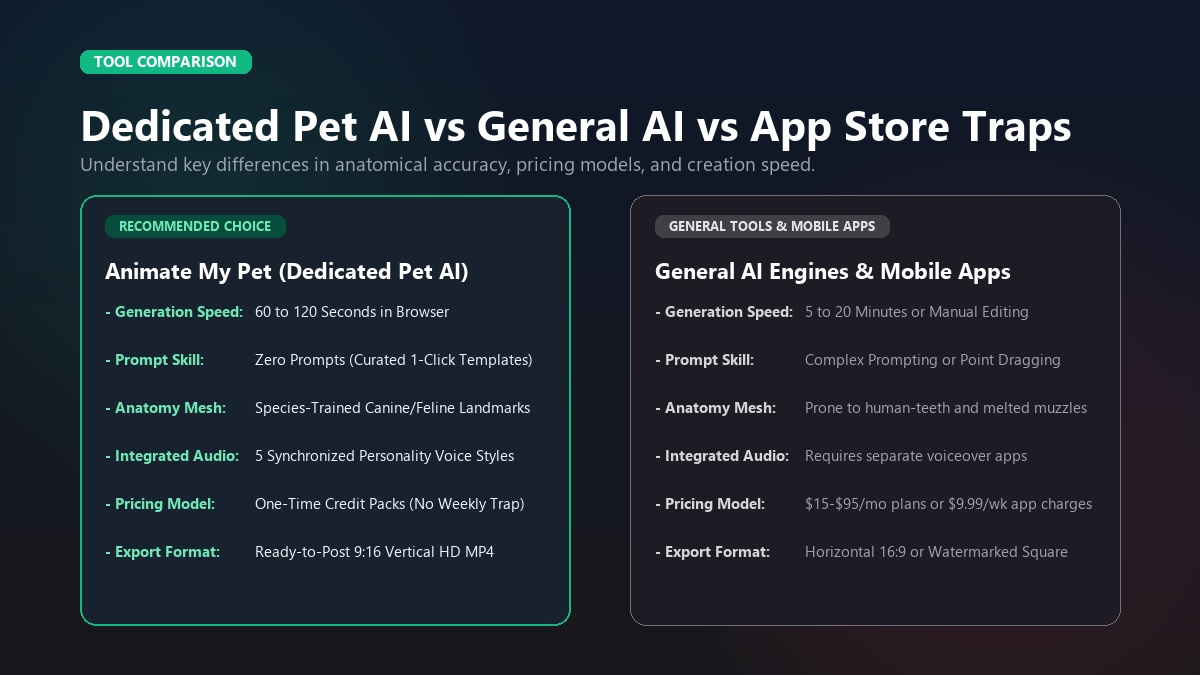
When choosing an AI video tool, creators typically encounter three distinct categories. Understanding the differences ensures you get high-quality results without unexpected expenses.
+-------------------+     +-------------------+     +-------------------+
|  ANIMATE MY PET   |     |  GENERAL AI TOOLS |     | MOBILE APP STORES |
|  - Zero prompts   |     |  - High learning  |     |  - Shady weekly   |
|  - Pet-trained    |     |  - Multi-limb bugs|        auto-renewals    |
|  - Pay-as-you-go  |     |  - Monthly plans  |     |  - Watermarks     |
+-------------------+     +-------------------+     +-------------------+
1. Dedicated browser-based pet tools (Animate My Pet)
Platforms engineered exclusively for pets train their diffusion weights on animal anatomy. They eliminate text prompts in favor of curated one-tap styles, automatically generate synchronized voice styles, and operate on transparent, one-time credit packs.
- Prompt Skill: Zero (One-tap templates).
- Anatomical Accuracy: High (Specifically trained on canine and feline facial landmarks).
- Pricing: Flexible one-time credit packs ($9.99 Starter, $24.99 Creator) with zero subscription lock-in.
- Format: Native 9:16 vertical HD MP4 ready for social platforms.
2. General AI video generators (Runway, Pika, Kling)
General-purpose video tools are built for filmmakers and digital artists. While powerful, they require detailed text prompt engineering and frequently struggle with animal proportions, causing pets to morph into strange shapes or walk on deformed paws.
- Prompt Skill: Advanced (Requires prompting camera motions, lighting terms, and negative prompts).
- Anatomical Accuracy: Inconsistent for animals without extensive fine-tuning.
- Pricing: Expensive recurring monthly subscriptions ($15–$95/month).
3. Mobile app store apps (Weekly subscription traps)
Many mobile talking pet apps in app stores offer "free 3-day trials" that quietly roll into recurring weekly charges of $7.99 to $9.99 ($32–$40 per month). Furthermore, these apps frequently plaster intrusive watermarks across exports unless users maintain an active subscription.
Feature comparison matrix
| Feature / Capability | Animate My Pet | General Video AI | Legacy Mobile Apps |
|---|---|---|---|
| Setup & Installation | 100% Web Browser (No install) | Web / Discord | iOS / Android app download |
| Prompt Engineering Required | No (Zero-Prompt) | Yes (Complex text prompts) | No (Manual point mapping) |
| Integrated Voice Personalities | Yes (5 Curated Styles) | Manual third-party audio | Basic microphone pitch shift |
| Video Aspect Ratio | Native 9:16 Vertical HD | Varies (16:9 standard) | 1:1 or 4:3 square |
| Pricing Model | One-time Credit Packs | Monthly recurring ($20–$60/mo) | Weekly recurring ($7.99–$9.99/wk) |
| Data Privacy & Auto-Deletion | Automatic (24h–7d) | Cloud library stored | Device / Vendor tracking |
For a complete breakdown of credit options, review our pricing plans.
Creator workflows: How to monetize and grow with AI pet videos
Pet influencers are among the fastest-growing creator niches on social media. Pet parents who consistently publish creative short-form content can build dedicated audiences and partner with pet brands.
+-------------------------------------------------------------+
|             VIRAL PET CONTENT CREATOR WORKFLOW              |
+-------------------------------------------------------------+
|  [Photo Asset]  -->  [1-Tap AI Video]  -->  [Trending Audio]|
|                             |                               |
|                             v                               |
|        [Multi-Platform Posting: TikTok / Reels / Shorts]     |
|                             |                               |
|                             v                               |
|        [Audience Growth & Brand Sponsorship Revenue]        |
+-------------------------------------------------------------+
1. Batch create weekly content in minutes
Instead of spending hours filming an uncooperative pet, creators can upload five different photos from a single camera roll session and generate an entire week's worth of content in 15 minutes. Alternate between comedic Talking Pet monologues, cinematic Movie Trailers, and Superhero adventures to keep your feed varied and engaging.
2. Leverage trending audio and pet humor
Pair your AI-generated pet animations with trending audio tracks on TikTok and Instagram Reels. Sassy cat animations pair exceptionally well with dry comedic voiceover trends, while energetic dog transformations thrive alongside high-energy pop music and movie soundbites.
3. Maintain pet privacy and safety
Always choose AI platforms that respect your privacy. Animate My Pet processes uploads through secure encrypted cloud channels and automatically purges original photos and generated video files from temporary storage within 24 hours to 7 days. Your pet photos remain strictly yours.
Frequently asked questions
What is an AI pet video generator and how does it work?
An AI pet video generator is a specialized software tool that uses computer vision and neural networks to convert a 2D pet photograph into an animated 10-second video. The system detects facial landmarks (eyes, ears, muzzle, mouth), applies realistic motion physics, and synchronizes mouth movement with audio scripts.
Do I need to write complex prompts to animate my pet?
No. With Animate My Pet, you do not need to write text prompts or configure complex technical settings. You simply upload a photo, select a pre-made template (such as Talking Dog, Pet Superhero, or Pet Movie Trailer), and the AI handles all motion and styling automatically.
Can I make my dog or cat speak with different voice styles?
Yes. Our Talking Pet AI feature includes five curated personality voice presets: Cute, Funny, Dramatic, Sassy, and Royal. Each preset adjusts vocal tone, pitch, and comedic delivery to suit your pet's breed and character.
What kind of photo works best for AI pet animation?
The best results come from a clear, well-lit photo taken at your pet's eye level. Ensure your pet is looking directly at the camera with both eyes and muzzle clearly visible, free from toys, leashes, or heavy shadows.
Are my uploaded pet photos stored permanently or kept private?
Your photos are strictly private. All uploaded images and generated video files are stored temporarily on secure cloud servers and automatically deleted within 24 hours to 7 days. Your media is never sold or used for public training datasets.
Can I try creating an AI pet video for free?
Yes. New users can sign up and claim 1 free high-definition AI pet portrait along with a video preview without entering a credit card. Paid one-time credit packs are available whenever you want to generate full watermark-free 10-second HD videos.
Conclusion: Bring your pet's personality to life today
Transforming your favorite dog or cat photos into vibrant, talking video clips is no longer reserved for professional animation studios. With zero-prompt templates, specialized animal facial recognition, and native 9:16 vertical exports, anyone can create viral-ready social media content and unforgettable family keepsakes in under two minutes.
Whether you want to see your French Bulldog deliver a sassy comedy routine, turn your rescue cat into a caped superhero, or create a touching adoption anniversary tribute, the tools are right at your fingertips.
Your 3-Step Action Plan:
- Snap a Clean Photo: Grab a front-facing snapshot of your pet in natural lighting.
- Pick Your Favorite Style: Choose between Talking Pet, Character Transformation, or Movie Trailer templates.
- Download & Share: Post your 10-second HD masterpiece directly to TikTok, Instagram Reels, or your family group chat.
Ready to see what your pet looks like in motion? Head over to Animate My Pet to create your first video, or claim 1 free AI pet portrait to get started today!