
Animate My Pet Blog
Create a Talking Dog Video From a Single Photo With AI
Sep 1, 2026
“Learn how to create a talking dog video from a single photo using AI. Upload one picture, pick a voice personality, and get a viral 9:16 vertical video in seconds.”
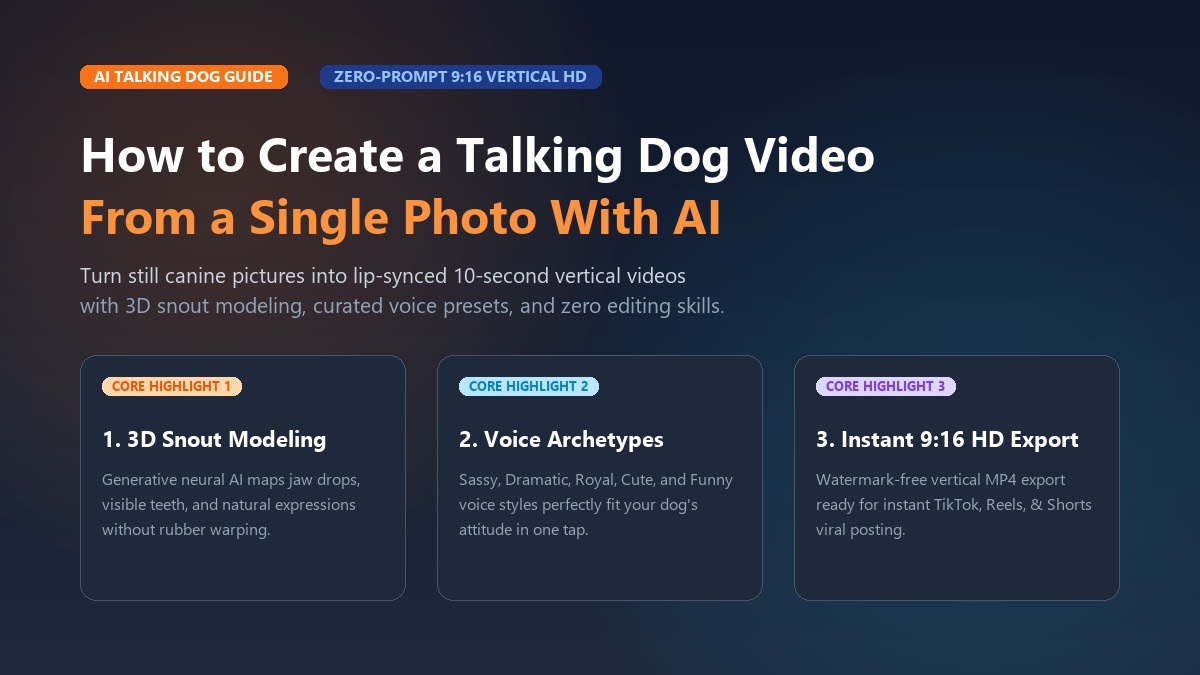
To create a talking dog video from a single photo using AI, upload a clear picture of your dog to Animate My Pet, select a talking template with your favorite voice personality, and generate a 10-second vertical HD video in under two minutes. Modern generative AI automatically maps your dog's snout, teeth, eyes, and expressions for realistic lip-syncing without video editing skills or prompt engineering.
Ever caught your dog staring at you with that dramatic side-eye? That unmistakable look that says, "You bought the cheap kibble again, and we both know this violates our lease."
Every pet parent knows that look. Our dogs have hilarious personalities and dramatic opinions about everything. Until recently, bringing those imaginary monologues to life was tough. You had to learn complex animation software or settle for clunky apps that warped your dog's face like rubber.
Modern AI changes the game completely. With browser-based tools, you can easily animate dog photo collections into viral videos for TikTok and Reels. Here's your complete guide on how to create a talking dog video from a single photo using AI—without subscriptions or headaches.
Key Takeaways
- 1-Tap Generation: Turn any static dog photo into a 10-second, lip-synced 9:16 vertical HD video in under two minutes.
- Canine Snout Modeling: Modern AI maps your dog's snout, jaw, teeth, and tongue naturally, avoiding the blurry mouth warping of older apps.
- Ready-to-Use Voices: Choose from fun personalities like Sassy, Dramatic, Royal, Cute, and Cynical without recording your own audio.
- No Subscription Traps: Simple credit packs ($9.99 Starter, $24.99 Creator) replace predatory $8/week mobile app subscriptions.
- Try for Free: You can claim 1 free AI pet portrait with no credit card required to test facial quality first.
+------------------------------------------------------------------------------------+
|                             THE 3-STEP CREATION PIPELINE                           |
+------------------------------------------------------------------------------------+
|  [Step 1: Upload Photo]    -->   [Step 2: Choose Voice Style]   -->   [Step 3: Export 9:16]  |
|  Clear, front-facing image       Cute, Sassy, Dramatic, Royal       Full HD MP4 ready for   |
|  with visible eyes & snout       or custom comedy monologue         TikTok, Reels & Shorts  |
+------------------------------------------------------------------------------------+
The Technology Shift: Generative AI Lip-Sync vs. 2D Puppet Warping
Old mobile pet animation apps used basic 2D mesh warping. You had to drag digital pins onto your dog's mouth and eyes. The app then stretched those pixels up and down across a frozen picture.
That approach looked fake and robotic. On dogs with long muzzles—like Golden Retrievers or Boxers—the mouth warped across their fur like a sticker.
[Legacy 2D Puppet Apps]              [Modern Generative Pet AI]
• 2D pixel mesh stretching           • 3D canine facial & snout mapping
• Manual pin placement               • Automatic neural feature recognition
• Rigid, frozen background           • Dynamic head tilts & micro-expressions
• Uncanny "rubber-band" mouth        • Realistic jaw drops, visible teeth & tongue
• App store download required        • 100% browser-based (iPhone, Android, PC, Mac)
Modern generative models take a huge leap forward. Instead of stretching flat pixels, generative pet animation AI models your dog's face in 3D.
It understands how a real canine jaw drops downward and backward. It renders realistic teeth and tongue movement inside the mouth. It even adds subtle head tilts and blinks that match the natural rhythm of speech.
How to Create a Talking Dog Video From a Single Photo in 3 Simple Steps
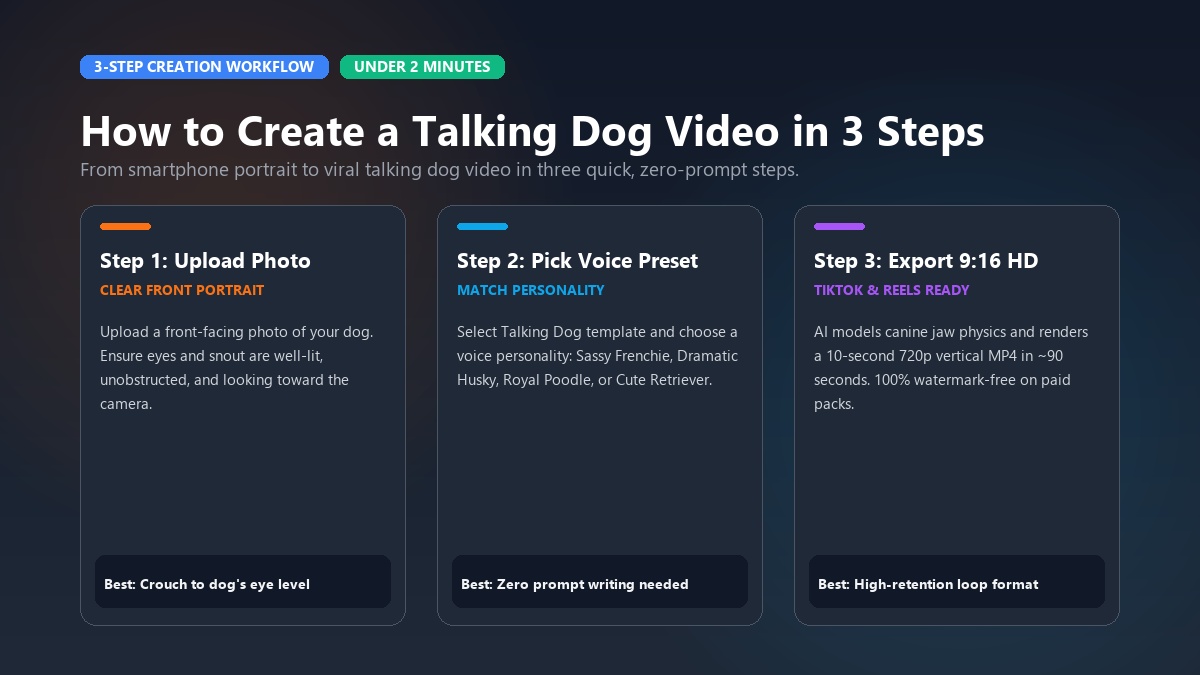
Making your first animated dog clip takes under two minutes. You don't need video editing tools, audio gear, or prompt writing skills. Just follow these three quick steps:
                  HOW TO CREATE A TALKING DOG VIDEO IN 3 STEPS

    +-------------------+       +-------------------+       +-------------------+
    |      STEP 1       |       |      STEP 2       |       |      STEP 3       |
    |   Upload Photo    | ----> |   Select Style    | ----> |   Export Video    |
    | Clear front shot  |       | Pick template and |       | 9:16 vertical HD  |
    | with eyes visible |       | voice personality |       | ready in ~2 mins  |
    +-------------------+       +-------------------+       +-------------------+
Step 1: Upload a Clear Photo of Your Dog
Head over to the Animate My Pet Studio on your phone or computer browser. Pick a sharp, well-lit photo of your dog in JPG, PNG, or WEBP format. For the best result, choose a picture where your pup looks straight at the camera with an unobstructed face.
Step 2: Select the Talking Dog Template and Voice Personality
Choose the Talking Dog template from the gallery. You don't have to write complicated AI prompts. Simply pick a pre-built voice personality that matches your pup's attitude:
- Sassy: Sarcastic, bold, and funny (great for Frenchies and Dachshunds).
- Dramatic: Overreacts to tiny everyday problems (perfect for Huskies and Pugs).
- Royal: Regal and demanding (ideal for Poodles and Dobermans).
- Cute: Pure puppy excitement and sweet enthusiasm (tailor-made for Retrievers and Corgis).
- Funny: Silly, chaotic meme energy.
Step 3: Generate and Download Your 9:16 Vertical HD Video
Click Generate and let the AI go to work. It synchronizes your dog's mouth, eyes, and expressions to the voice track in about 90 seconds.
Download your ready-to-post 10-second HD video right to your camera roll. Paid exports come 100% watermark-free in native 9:16 vertical format, built specifically for TikTok, Reels, and Shorts.
Ready to hear your dog talk? You can create an AI pet video now and get your first video in minutes.
Photo Selection Blueprint: How to Pick the Best Dog Picture
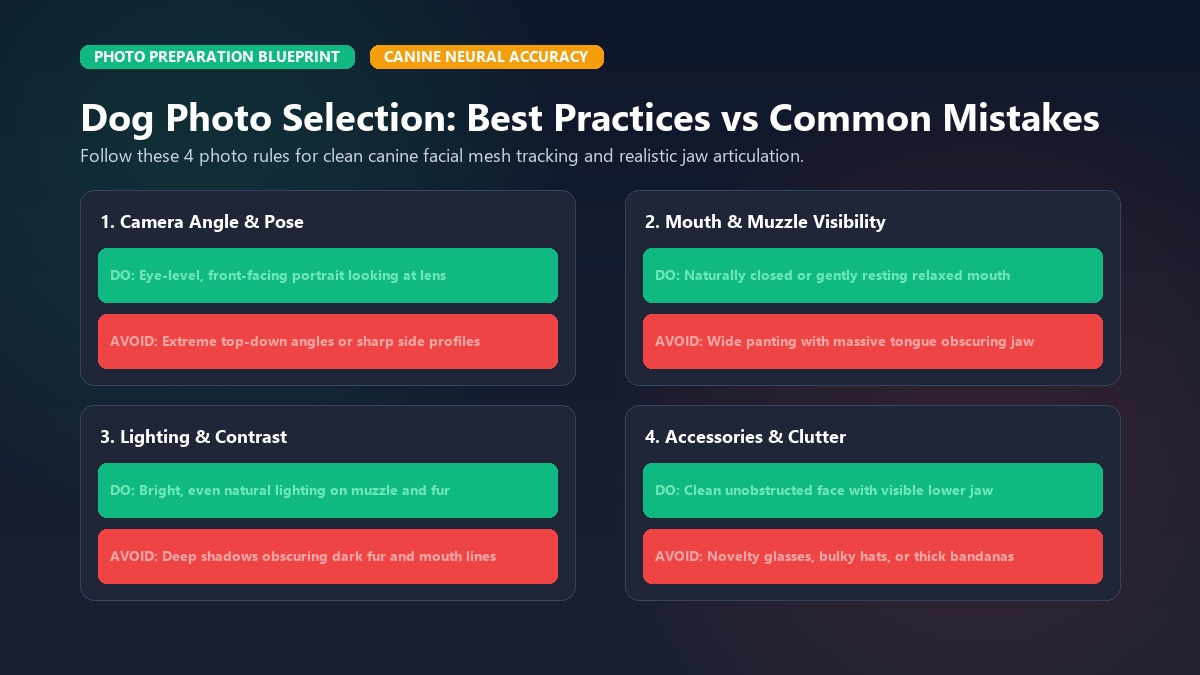
Your source photo sets the stage for a great video. Following a few easy photo tips helps the AI track your dog's face cleanly without awkward glitches.
+------------------------------------------------------------------------------------+
|                         PHOTO PREPARATION GUIDELINES                               |
+------------------------------------------------------------------------------------+
|  DO:                                    |  DON'T:                                  |
|  • Eye-level, front-facing angle        |  • Extreme bird's-eye or side profiles   |
|  • Natural, even lighting on snout      |  • Deep shadows obscuring dark fur       |
|  • Mouth closed or gently resting       |  • Wide panting with tongue hanging out  |
|  • Uncluttered background               |  • Sunglasses, heavy collars, or hats    |
+------------------------------------------------------------------------------------+
1. Shoot at Eye Level
Crouch down and snap the picture at your dog's eye level. Don't take the photo from high above while standing. An eye-level angle lets the AI calculate the true depth of your dog's snout, nose, and brow line.
2. Pick a Closed or Gently Resting Mouth
Panting dogs look happy, but a wide-open tongue makes speech animation tricky. It's tough for the AI to close the mouth on consonants like "B" or "M". A closed or slightly relaxed mouth gives the model the cleanest canvas for smooth speech.
3. Use Bright, Even Lighting for Dark Fur
Black Labs and dark Frenchies often lose detail in dim rooms. Snap your photo near a bright window or outside in gentle shade. Clear contrast around the muzzle helps the AI separate the lips and teeth from the fur.
4. Remove Face Accessories
Take off novelty glasses, bulky hats, or thick bandanas before shooting. The AI needs a clear view of the lower jaw to animate smooth lip-syncing.
Curated Voice Archetypes and Viral Script Frameworks
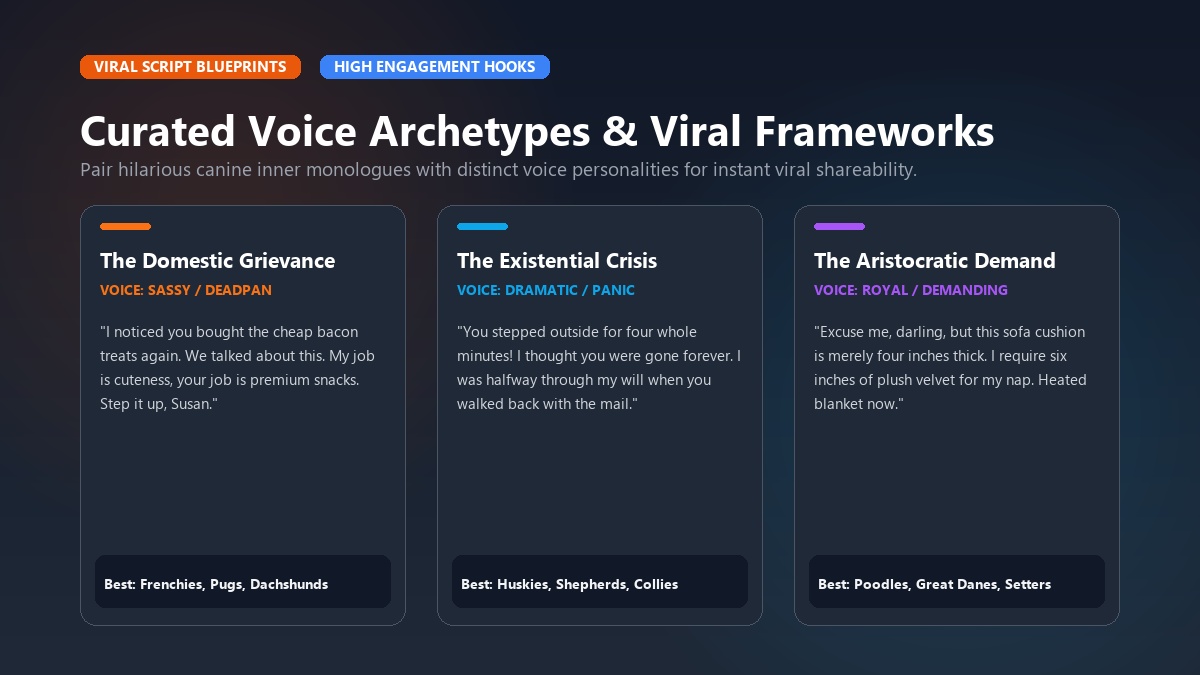
Great social videos hook viewers right away. Pairing the right voice with funny, relatable canine drama makes clips people can't resist sharing.
+------------------------------------------------------------------------------------+
|                       VIRAL SCRIPT FRAMEWORK MATRIX                                |
+------------------------------------------------------------------------------------+
| Archetype  | Best Breeds              | Core Theme              | 3-Second Hook    |
+------------+--------------------------+-------------------------+------------------+
| Sassy      | Frenchie, Pug, Dachshund | Domestic grievances     | "We need to talk"|
| Dramatic   | Husky, German Shepherd   | Existential panic       | "The door was 2m"|
| Royal      | Poodle, Doberman, Setter | Demanding luxury service| "My kibble is dry|
| Cute       | Golden Retriever, Corgi  | Pure innocent excitement| "Did somebody...?"|
+------------------------------------------------------------------------------------+
Framework 1: The Domestic Grievance (Sassy Voice)
Best for: French Bulldogs, Dachshunds, Boston Terriers, and Chihuahuas.
Core Angle: The dog acts like an annoyed landlord dealing with messy human roommates.
"I noticed you bought the cheap bacon treats again. We talked about this. My job is providing 24/7 cuteness, and your job is premium snacks. Step it up, Susan."
Framework 2: The Existential Crisis (Dramatic Voice)
Best for: Siberian Huskies, German Shepherds, and Collies.
Core Angle: Treating small everyday moments like giant emergencies.
"You stepped outside for four whole minutes. I thought you were gone forever. I was halfway through writing my will when you walked back in with the mail. Unbelievable."
Framework 3: The Aristocratic Demand (Royal Voice)
Best for: Standard Poodles, Great Danes, and Afghan Hounds.
Core Angle: A posh pet demanding luxury room service and five-star treatment.
"Excuse me, darling, but this sofa cushion is merely four inches thick. I require at least six inches of plush velvet for my afternoon nap. Bring the heated blanket immediately."
Framework 4: The Pure Excitement Loop (Cute Voice)
Best for: Golden Retrievers, Labradors, and Corgi puppies.
Core Angle: Boundless energy, treat obsession, and happy chaos.
"Did you say walk? Or was that wok? It doesn't matter because I've already got my leash, your sneakers, and my ball. Let's go right now!"
+------------------------------------------------------------------------------------+
|                         CREATOR SPOTLIGHT: DAILY VIRAL SKITS                       |
+------------------------------------------------------------------------------------+
| Marcus, a creator from Austin, built a 120,000-follower TikTok channel in 45 days  |
| by posting daily 10-second "Cynical Retriever" monologues. Using Animate My Pet's  |
| browser workflow, he generates each clip in under 3 minutes while making morning   |
| coffee, averaging over 40,000 organic views per video without video editing software.|
+------------------------------------------------------------------------------------+
Want more comedy scripts and ideas? Check out our Talking Pet AI Hub to explore what creators are making right now.
Expanding Beyond Talking Heads: Character Transformations
Talking head clips are hilarious, but you don't have to stop there. Modern AI lets you place your pup into epic cartoon adventures while keeping their recognizable face.
                               EXPANDING YOUR CREATIVE FORMATS

         +-------------------------------------------------------------+
         |               TALKING DOG BASE ANIMATION                    |
         |         Expressive mouth sync, head tilts & vocal styles    |
         +-------------------------------------------------------------+
                                       |
        +------------------------------+------------------------------+
        |                              |                              |
        v                              v                              v
+-------------------+        +-------------------+        +-------------------+
|   PET SUPERHERO   |        |     PET CHEF      |        |   MOVIE TRAILER   |
| Heroic cape, epic |        | Chef hat, gourmet |        | Blockbuster VO &  |
| action & lighting |        | kitchen comedy    |        | dramatic zooms    |
+-------------------+        +-------------------+        +-------------------+
With Animate My Pet Templates, you can transform your pup with one click:
- Pet Superhero: Puts your dog in a flying cape against a dramatic skyline.
- Pet Chef: Puts your dog in a gourmet kitchen with a chef hat and culinary chaos.
- Pet Rockstar: Adds stage lights, guitars, and rocking concert energy.
- Pet Goes To Space: Outfits your pup in a zero-gravity astronaut suit among the stars.
- Pet Movie Trailer: Adds Hollywood voiceover narration and dramatic trailer pacing.
+------------------------------------------------------------------------------------+
|                         KEEPSAKE SPOTLIGHT: A BIRTHDAY SURPRISE                    |
+------------------------------------------------------------------------------------+
| Elena used a single photo of her rescue German Shepherd, Max, to create a          |
| "Pet Superhero" video thanking her husband for his support. The 10-second clip     |
| featured Max in a cape praising his dad's barbecue skills, becoming the highlight  |
| of the family birthday party and receiving hundreds of shares in family chats.     |
+------------------------------------------------------------------------------------+
Video Tutorial: Animating Pet Photos with AI
Want to see how easy the process is? Watch this quick video walkthrough:

Video: Quick walkthrough of photo-to-video AI animation, mouth tracking, and 9:16 export.
Why Transparent Credit Packs Beat Predatory App Subscriptions
Nothing ruins the fun like downloading an app only to hit an immediate $7.99/week paywall. That's over $400 a year for an app you might only use once or twice a month.
Animate My Pet keeps things simple with one-time credit packs. Buy credits when you want them, and keep them as long as you like. They never expire.
+--------------------------------------------------------------------------------------+
|                     PRICING & PLATFORM COMPARISON MATRIX                             |
+--------------------------------------------------------------------------------------+
| Feature / Tier       | Animate My Pet           | Mobile App Store Apps | Pro Multi-Tools  |
+----------------------+--------------------------+-----------------------+------------------+
| Billing Model        | One-Time Credit Packs    | $7.99–$9.99 / Week    | $29–$49 / Month  |
| Expiration           | Credits Never Expire     | Recurring Auto-Renew  | Monthly Reset    |
| Learning Curve       | Zero Prompts (1-Tap)     | Basic Slider Controls | Complex Pipelines|
| Platform Support     | Web (iOS, Android, PC)   | App Store Locked      | Discord / API    |
| Watermark Removal    | Included on Paid Packs   | Subscription Required | Pro Tier Only    |
| Starting Price       | $9.99 (3 Videos + 5 Pics)| $35+/Month Ongoing    | $29/Month Base   |
+--------------------------------------------------------------------------------------+
Choose Your Pack
- Free Trial ($0): Get 1 Free AI Pet Portrait and a 3-second preview. No card required.
- Starter Pack ($9.99): 3 Videos + 5 AI Pet Portraits. Perfect for testing ideas and family fun.
- Creator Pack ($24.99 - Most Popular): 10 Videos + 15 AI Pet Portraits. Made for regular TikTok and Reels creators.
- Viral Pack ($49 / $59): 25 Videos + 30 AI Pet Portraits. Best value for active accounts and multi-pet homes.
Explore all options on our pricing page to find the right fit.
Privacy, Data Security, and Ethical Creation
Your pet photos are private memories. That's why we take data security seriously:
- Auto-Deletion: Uploaded photos and videos are stored safely in cloud storage and automatically deleted within 24 hours to 7 days.
- No Data Selling: We don't sell your images to advertisers or third-party datasets.
- Safe Web Access: Since everything runs in your browser, you don't have to install unfamiliar apps on your device.
Frequently Asked Questions
How does AI make a dog talk from just one photo?
The AI uses a neural model trained on canine facial anatomy. It spots key markers like the snout, jaw, teeth, and eyes. When you choose audio, the AI animates the mouth frame by frame to match the speech sounds naturally.
Do I need to record my own voice, or are dog voices built in?
You can do both. Animate My Pet comes with pre-built voices (Sassy, Dramatic, Royal, Cute, Funny) so you can create videos in one tap. You can also upload your own audio file if you want to use a custom voice.
Can AI animate dogs with long snouts or dark fur without distorting?
Yes! Pet-specific models are trained on canine snout geometry. For dark dogs like Black Labs, just make sure you use bright, even lighting so the AI can see the outline of the mouth.
What format and resolution do the generated videos use?
Videos export in crisp 720p HD MP4 format. They're rendered in 9:16 vertical ratio, so they fit full-screen on TikTok, Instagram Reels, and YouTube Shorts without cropping.
How long does it take to generate a talking dog video?
Most 10-second videos take about 60 to 120 seconds to generate on our cloud servers. You don't have to wait around or tie up your phone's battery.
Can I try the tool for free before purchasing credits?
Yes! Every new user can generate a free cute pet portrait upon signup, plus a 3-second video preview—no credit card needed.
Conclusion: Bring Your Dog's Inner Voice to Life
You don't need video editing skills or expensive studio tools to make your dog talk. With modern AI, a single photo and a couple of clicks are all you need to create funny, high-quality videos that showcase your pup's unique personality.
Getting started is easy and completely risk-free:
- This Afternoon: Pick a cute photo of your dog and create an AI pet video or test the quality with a free pet portrait.
- This Weekend: Pick a hilarious voice style—like the Sassy Tenant or Dramatic Husky—and share your vertical video on TikTok, Reels, and Shorts.