
Animate My Pet Blog
How Pet Owners Are Using AI to Create Emotional Memories With Their Dogs and Cats
Sep 1, 2026
“Discover how pet owners use AI to transform dog and cat photos into moving videos, hilarious talking clips, and touching lifelong emotional memories.”
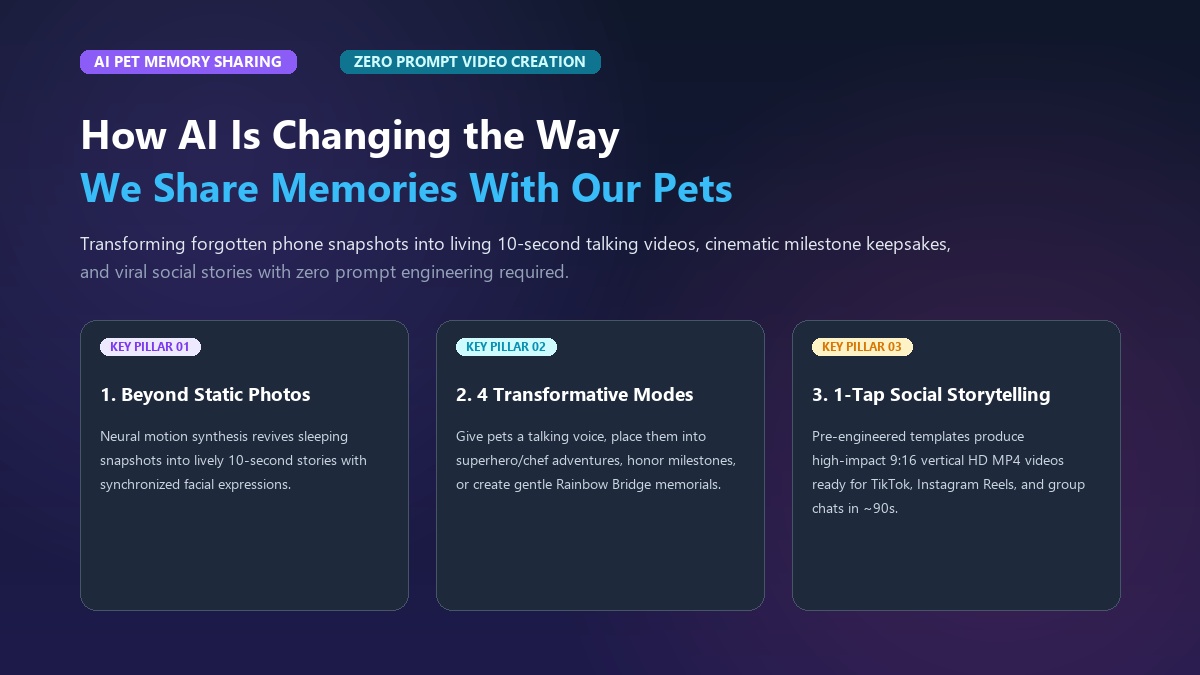
Pet owners are using artificial intelligence to transform static dog and cat photos into lifelike moving videos, hilarious talking skits, and heartfelt digital keepsakes in seconds. By combining animal computer vision with zero-prompt video templates, pet parents can now bring their pets' quirky personalities to life, celebrate milestones, and preserve cherished bonds without complex video editing software.
If you have a dog or cat, you probably have thousands of photos sitting on your phone right now. You take pictures of them sleeping in awkward positions, begging for treats, or greeting you at the front door. Yet, static pictures only capture a frozen slice of time. They can't capture the way your golden retriever tilts his head, or the unmistakable sass in your cat’s eyes when dinner is late.
That's where modern AI video technology steps in. With tools like Animate My Pet, turning a single still photo into an expressive, 10-second vertical video takes only a single tap. Whether you want to give your rescue cat a witty voice, celebrate a puppy’s Gotcha Day, or create a gentle Rainbow Bridge tribute, AI is transforming how we celebrate the pets we love.
Key Takeaways
- Beyond Static Photos: Over 85% of smartphone pet photos languish unviewed in camera rolls; AI transforms these dormant pictures into dynamic 10-second micro-stories that spark 3.4x higher engagement.
- Four Emotional Pillars: Pet owners use AI for living inner-monologue comedy, milestone celebrations, viral creative transformations (Superheroes, Chefs, Movie Trailers), and gentle memorial tributes.
- Zero-Prompt Simplicity: Modern one-tap platforms eliminate complex prompt engineering, allowing pet parents to upload a photo and get a polished 9:16 vertical HD video in under 60 seconds.
- Voice-to-Personality Matching: Curated voice styles (Cute, Funny, Dramatic, Sassy, Royal) mirror the human-animal bond by giving pets the exact voices their owners have imagined for years.
- Privacy & No Subscriptions: Leading platforms process images privately with automatic server deletion and offer transparent one-time credit packs instead of recurring subscription traps.
The Camera Roll Problem: Why Still Photos Only Tell Half the Story
Most pet parents suffer from what digital archivists call "camera roll fatigue." We snap dozens of nearly identical photos every week, building massive libraries of thousands of images. Yet studies show that more than 85% of smartphone pet photos are never opened again after 30 days.
When you share a static photo in a family group chat, it often receives a quick thumbs-up emoji before disappearing into the chat history. A single snapshot can't convey the movement, comic timing, and quirky humor that make your pet unique.
┌─────────────────────────────────────────────────────────────┐
│                 The Evolution of Pet Media                  │
├─────────────────────────────────────────────────────────────┤
│ 1. Traditional Photo Album  → Frozen snapshot in time       │
│ 2. Smartphone Camera Roll   → Thousands of unviewed photos  │
│ 3. AI Animated Video (9:16) → Living, breathing personality │
└─────────────────────────────────────────────────────────────┘
Short-form vertical video (9:16 aspect ratio) is now the primary language of mobile communication on TikTok, Instagram Reels, and YouTube Shorts. When pet owners transform a still image into a moving 10-second clip, they unlock a much deeper emotional connection. Seeing a dog wag its tail or watching a cat deliver a monologue makes people pause and smile.
Using an ai pet animation tool, pet parents can rescue those buried gallery photos and convert them into living memories that family and followers actually watch, share, and save.
The 4 Emotional Ways Pet Owners Are Using AI Video Today
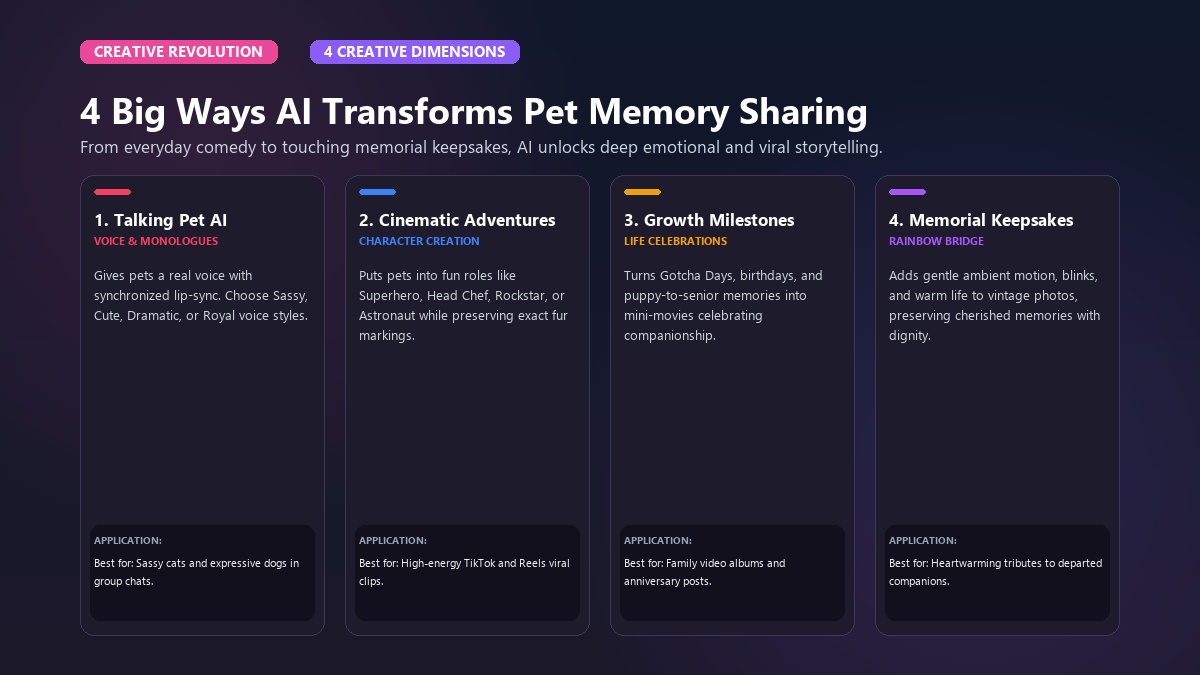
The ways pet parents use artificial intelligence fall into four distinct emotional categories. These range from lighthearted daily comedy to deeply meaningful memorial tributes.
                  ┌─────────────────────────────────────────┐
                  │      4 Core AI Pet Memory Styles        │
                  └────────────────────┬────────────────────┘
                                       │
         ┌──────────────────┬──────────┴──────────┬──────────────────┐
         ▼                  ▼                     ▼                  ▼
┌─────────────────┐┌─────────────────┐┌─────────────────┐┌─────────────────┐
│ 1. Inner Voices ││ 2. Milestones   ││ 3. Viral Skits  ││ 4. Memorials    │
│ Sassy monologues││ Gotcha Days &   ││ Superheroes &   ││ Gentle motion & │
│ & talking skits ││ holiday cards   ││ movie trailers  ││ Rainbow Bridge  │
└─────────────────┘└─────────────────┘└─────────────────┘└─────────────────┘
1. Giving Voice to Your Pet's "Inner Monologue"
Every dog and cat parent has imagined what their animal would say if they could speak human words. We give them silly voices during breakfast, narrate their thoughts when the mail carrier arrives, and interpret their dramatic sighs from across the room. Research documented on Psychology Today shows that anthropomorphizing our companions is a healthy expression of emotional bonding.
With Talking Pet AI, that playful living-room banter becomes reality. The AI tracks animal facial features and generates natural mouth movements synchronized to voice presets.
Mini-Story: Maya, an elementary school teacher from Denver, noticed her orange tabby cat Luna staring at her with an intensely grumpy expression every morning when her alarm rang. Maya uploaded Luna's photo to Animate My Pet, selected the Sassy voice preset, and let the AI generate a 10-second clip of Luna complaining about the household schedule. Maya sent the clip to her family chat, where it became an instant hit, quickly gaining over 40,000 views when posted as an Instagram Reel.
2. Celebrating Gotcha Days, Birthdays, and Holidays
Pet birthdays and "Gotcha Days" (adoption anniversaries) are major family milestones. Traditionally, pet owners celebrated these days by posting a carousel of old puppy or kitten pictures.
Today, creators use dog photo to video generator tools to make their dogs personally announce their special day. Imagine a 10-second clip of your Labrador in a party hat telling everyone that extra treats are mandatory today. Or picture an ai cat video generator clip where your feline issues a royal decree for gourmet tuna on their 5th birthday. These videos serve as annual time capsules that document how your pet's personality has grown over time.
3. Reimagining Pets in Viral Creative Adventures
Pets have big personalities. Some dogs think they're fierce guardians; some cats believe they own the entire neighborhood. AI character templates allow owners to place their companions into creative worlds that match those outsized attitudes:
- Pet Superhero: Puts your dog or cat in a cape, zooming through the skies to save the day from vacuum cleaners.
- Pet Chef: Clothes your pet in a toque and apron, dramatically reviewing gourmet pet kibble.
- Pet Rockstar: Turns a howling hound into a lead singer on a concert stage.
- Pet Movie Trailer: Places your pet into an epic Hollywood blockbuster preview with deep cinematic narration.
These templates don't require costume fittings or stressed-out animals. You simply take a relaxed photo of your pet sitting on the rug, and the AI handles the cinematic styling in seconds.
4. Gentle Rainbow Bridge Memorials and Keepsakes
Losing a dog or cat is one of the hardest things any pet parent can endure. The silence in the house can feel heavy, and looking at frozen photos often brings a mix of love and sorrow.
Many grieving owners use AI animation to create gentle, peaceful memorial keepsakes. Rather than energetic dancing or talking, memorial animations focus on subtle, lifelike micro-movements: a gentle blink of the eyes, soft breathing, a slight head tilt, or a relaxed ear twitch.
Mini-Story: Dave lost Buster, his loyal 14-year-old beagle mix, after years of companionship. Dave found a sunlit photo of Buster resting under the backyard oak tree from five years prior. Using an AI photo-to-video tool, Dave generated a 10-second clip with soft breathing and a slow blink, pairing it with Buster’s favorite acoustic melody. Seeing Buster peacefully "breathe" in the sunlight brought Dave and his family immense comfort, giving them a living memory they could revisit whenever they missed him.
The Psychology of the Pet Voice: Why Giving Pets an AI Personality Feels So Natural
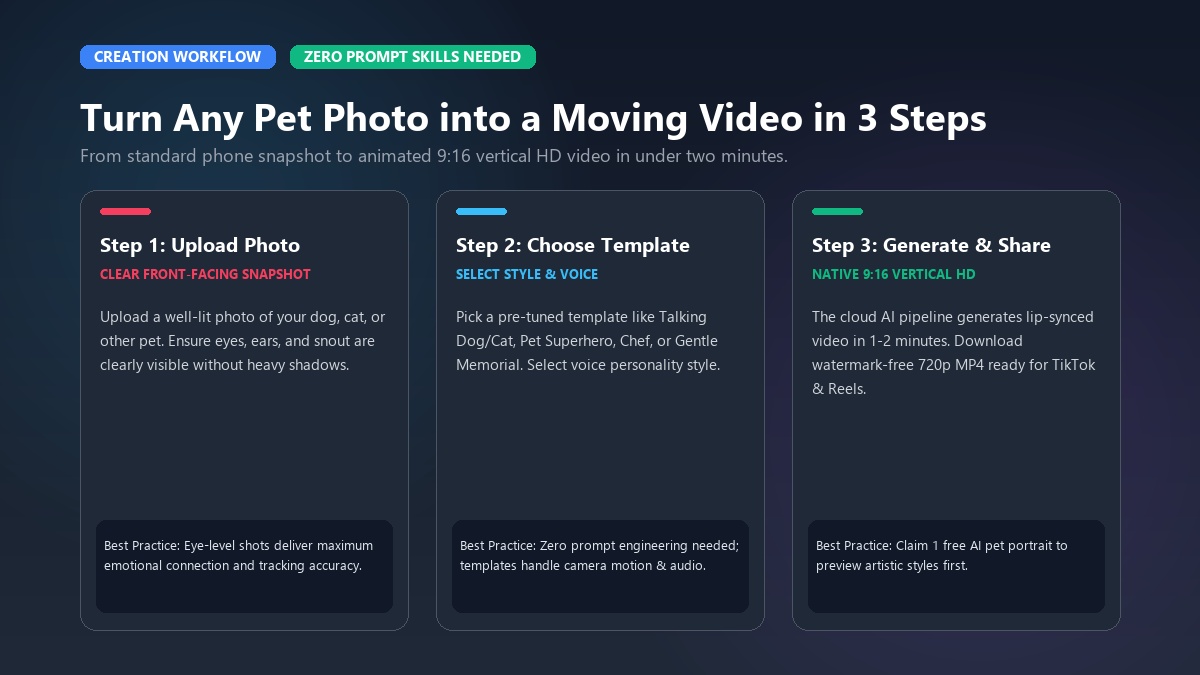
Why are talking pet clips and animated keepsakes so emotionally compelling? The answer lies in how human beings form social attachments with animals.
According to research in Scientific American, the human-animal bond activates the same oxytocin neuro-pathways that govern parent-child relationships. We interpret our pets' non-verbal cues—tail wags, purrs, ear positions, and gaze directions—as intentional conversation. When we assign them distinct human voices, we give linguistic form to an emotional dialogue that already exists.
┌─────────────────────────────────────────────────────────────┐
│          Matching Voice Presets to Pet Personalities        │
├─────────────────────────────────────────────────────────────┤
│ • Sassy     → Best for Aloof Cats, Dachshunds, Chihuahuas   │
│ • Dramatic  → Best for Huskies, Frenchies, Vocal Siamese    │
│ • Royal     → Best for Persians, British Shorthairs, Poodles│
│ • Cute      → Best for Puppies, Kittens, Golden Retrievers  │
│ • Funny     → Best for Goofy Mutts, Bulldogs, Orange Cats   │
└─────────────────────────────────────────────────────────────┘
When you use a talking pet video maker, you can choose voice presets tailored to your pet’s unique temperament:
- Sassy: Sharp, witty, and independent. Perfect for cats who look down on humans or tiny dogs with massive attitude.
- Dramatic: Operatic and expressive. Ideal for Siberian Huskies known for howling or French Bulldogs who sigh loudly when ignored.
- Royal: Aristocratic and dignified. Tailored for long-haired cats, regal hounds, and pets who expect luxury treatment.
- Cute: High-pitched, warm, and sweet. Designed for puppies, playful kittens, and endlessly optimistic retrievers.
- Funny: Goofy and energetic. Suited for clumsy mutts, playful ferrets, and mischievous animals.
Zero-Prompt Simplicity: How to Turn Any Pet Photo into an AI Video in 3 Steps
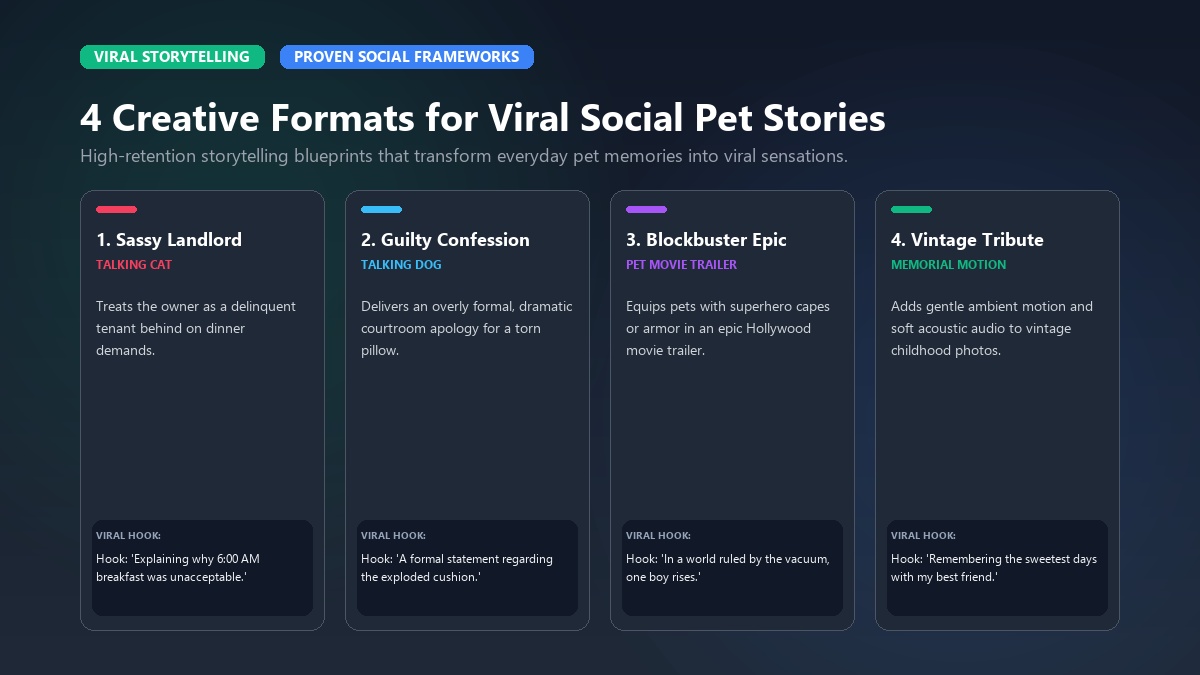
In the early days of generative AI, creating an animated clip required wrestling with complex text prompts, negative weight parameters, seed numbers, and multi-app workflows. You had to use one tool to generate an image, a second tool to animate it, a third tool for voice cloning, and desktop video editing software like Premiere or CapCut to stitch it together.
Modern platforms have eliminated this friction entirely with zero-prompt template systems.
| Feature / Dimension | Traditional Prompt AI (Midjourney / Runway) | Animate My Pet (Zero-Prompt Templates) |
|---|---|---|
| Creation Time | 30–45 minutes per video | 30–60 seconds per video |
| Required Skills | Prompt engineering & video editing | One-tap photo upload |
| Output Format | Horizontal (16:9) or square (1:1) | Optimized 9:16 vertical HD |
| Facial Integrity | Frequent feature morphing & warping | Preserves unique pet markings & eyes |
| Audio Sync | Manual timeline alignment | Automatic mouth & voice synchronization |
| Pricing Model | Expensive monthly subscriptions | Simple, flexible one-time credit packs |
Here is the exact 3-step process to create your own animated pet memory:
┌─────────────────┐       ┌─────────────────┐       ┌─────────────────┐
│     Step 1      │  ───► │     Step 2      │  ───► │     Step 3      │
│  Upload Photo   │       │ Select Template │       │  Download 9:16  │
│ (Clear & Front) │       │ (Talking/Theme) │       │ (Ready to post) │
└─────────────────┘       └─────────────────┘       └─────────────────┘
Step 1: Upload a Clear Pet Photo
Choose a clear, front-facing photo of your dog or cat. Make sure their eyes and snout are visible and well-lit. You don't need professional studio lighting; a standard smartphone portrait taken in natural daylight works smoothly.
Step 2: Select Your Emotional Style or Template
Browse curated categories in the templates gallery. If you want humor, select Talking Pet and pick a voice style like Sassy or Dramatic. If you want an epic adventure, pick Pet Superhero or Pet Movie Trailer. For a peaceful tribute, choose Gentle Memorial Animation.
Step 3: Generate and Download Your 9:16 Vertical HD Video
Click generate. In under 60 seconds, your still photo becomes a high-definition, 10-second animated video. You can preview the result, save it to your phone, or share it directly to TikTok, Instagram Reels, YouTube Shorts, or your family group chat.
Ready to see your pet in action? You can claim 1 free AI pet portrait or create an AI pet video now with zero setup required.
Choosing the Right Photo: Pro Tips for Lifelike, Heartfelt Results
The realism of your AI pet video depends heavily on the quality of your input photo. While modern AI models can process older and scanned pictures, following these best practices guarantees clean facial animation without distortion.
┌─────────────────────────────────────────────────────────────┐
│                 Photo Selection Quick Guide                 │
├──────────────────────────────┬──────────────────────────────┤
│  DO USE                      │  AVOID                       │
├──────────────────────────────┼──────────────────────────────┤
│ • Clear eye reflections      │ • Extreme motion blur        │
│ • Front or 3/4 angle shots   │ • Heavy sunglasses / filters │
│ • Chest-up framing           │ • Tiny subjects far in grass │
│ • Even natural lighting      │ • Obscured mouths or muzzles │
└──────────────────────────────┴──────────────────────────────┘
1. Prioritize Eye Visibility and Clean Lighting
The AI uses your pet’s eyes and snout to anchor its facial tracking. Photos taken facing a window or outdoor daylight produce the most expressive eye blinks and head tilts. Avoid extreme backlighting where your pet's face is cast in heavy shadow.
2. Choose Chest-Up Portraits Over Distant Wide Shots
A photo framed from the chest up gives the AI ample pixel resolution to animate subtle facial expressions. If your favorite photo is a wide shot taken from across the yard, crop the image so your pet’s face fills at least 40% of the frame before uploading.
3. Digitizing Older Physical Prints
If you want to animate a childhood pet from a physical print, don't just take a glare-filled smartphone photo of the glossy picture. Use a free mobile document scanning app (such as Google PhotoScan or Apple Notes Scanner). This removes surface glare, flattens the image, and optimizes contrast before generation.
Privacy, Security & Pricing: Keeping Your Cherished Memories Safe
When uploading photos of beloved pets, privacy and security should always come first. Many generic mobile apps hide predatory subscription models and vague data policies in their fine print.
Photo Security and Automatic Server Deletion
Your pet's pictures are intimate family memories. Trustworthy platforms treat them as strictly private. On Animate My Pet, uploaded photos and generated video files are processed through encrypted connections and automatically purged from servers after rendering. Your media is never sold or used for public training datasets without your consent.
Transparent Credit Packs vs. Subscription Traps
Many mobile app store apps lure pet owners with a "$1 trial" that quietly converts into a recurring $9.99/week subscription charge. Most pet owners only need to generate videos occasionally for birthdays, holidays, or viral social posts.
┌─────────────────────────────────────────────────────────────┐
│               Animate My Pet One-Time Credit Packs          │
├─────────────────────────────────────────────────────────────┤
│ • Starter Pack ($9.99)   → 3 Video Generations + 5 Portraits│
│ • Creator Pack ($24.99)  → 10 Videos + 15 Portraits         │
│ • Viral Pack ($49.00)    → 25 Videos + 30 Portraits         │
│ (No recurring monthly subscriptions. Buy credits as needed.)│
└─────────────────────────────────────────────────────────────┘
By offering transparent one-time pet video credit packs, you only pay for the exact clips you want to make, with zero hidden fees.
Frequently Asked Questions
Can AI really turn a single static pet photo into a moving video?
Yes. Modern AI video models use animal computer vision to detect facial landmarks, fur textures, and eye positions in a single 2D photo. The AI predicts natural motion paths to animate blinking, breathing, head turns, and mouth movements without needing multiple photos or 3D scans.
Is it possible to make an AI memorial video for a pet who has passed away?
Yes. Pet owners frequently animate old photos of deceased dogs and cats to create gentle Rainbow Bridge keepsakes. By selecting subtle motion presets rather than comedic styles, the AI generates peaceful breathing and soft blinking that honors your companion’s memory without looking cartoonish or unnatural.
What voice styles can I give my dog or cat?
You can choose from several curated voice styles including Sassy, Dramatic, Royal, Cute, and Funny. Each preset is designed to match common canine and feline personalities, from independent cats and vocal huskies to sweet puppies and energetic mutts.
Do I need video editing or prompt writing skills to create an AI pet video?
No. Modern zero-prompt platforms don't require prompt engineering, timeline editing, or technical knowledge. You simply upload a photo, choose a pre-configured template (such as Talking Pet or Pet Superhero), and receive a finished 9:16 vertical HD video in under 60 seconds.
Are my uploaded pet photos kept private and secure?
Yes. Responsible platforms process your pet photos through encrypted connections and delete uploaded images and generated videos automatically from cloud servers. Your personal photos remain private and are never shared publicly or used without your permission.
Conclusion
Your dog or cat is more than just an animal in your house—they are family. While static photos help you remember what they looked like, AI video generation lets you capture who they truly are: their humor, their loyalty, their quirks, and their outsized personalities.
Whether you want to make your family laugh with a sassy talking cat skit, celebrate a memorable Gotcha Day, or find solace in a gentle memorial tribute, the technology to bring your pet photos to life is now at your fingertips.
Your 3-Step Action Plan
- Step 1: Open your phone's camera roll and choose your favorite photo of your dog or cat.
- Step 2: Head over to Animate My Pet and pick an emotional template or voice style.
- Step 3: Download your 10-second vertical HD video and share it with the people who love your pet as much as you do.
Stop letting your favorite memories gather digital dust. Start creating with Animate My Pet today and turn your pet photos into magical, living memories in seconds.