
Animate My Pet Blog
From Photo to Personality: AI Brings Your Pet to Life
Aug 29, 2026
“Discover how AI turns pet photos into living, talking characters with unique voices and expressions. Create viral 9:16 pet videos in seconds with zero prompts.”
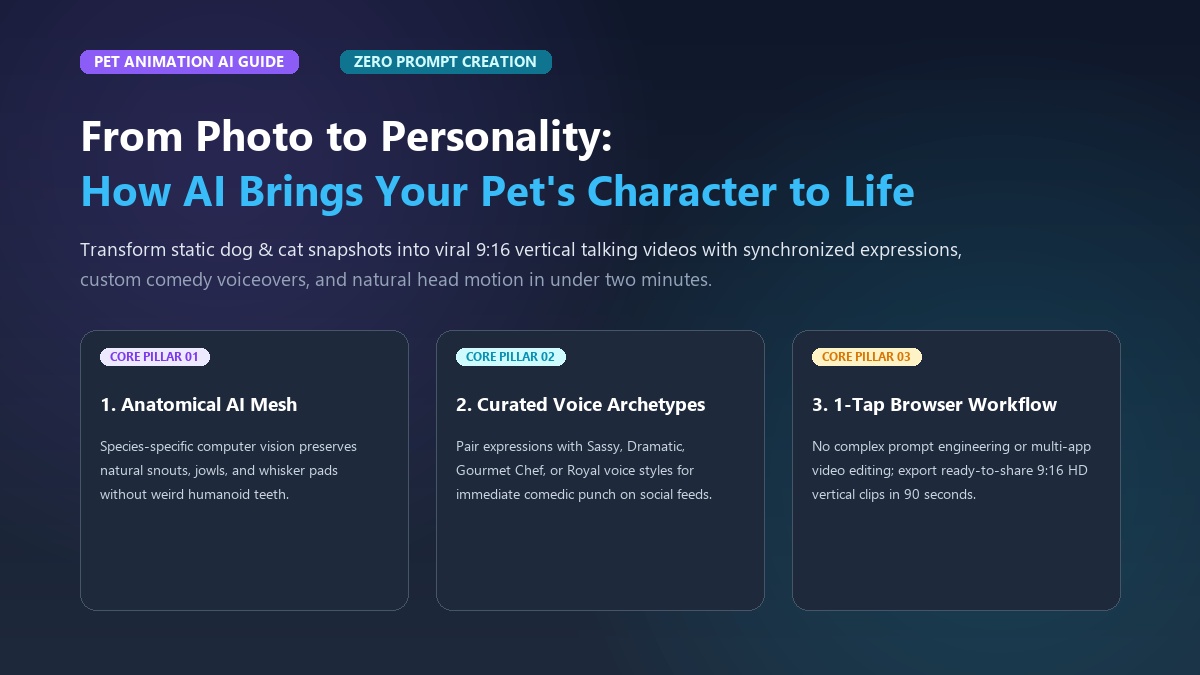
Modern generative tools transform a single static pet photo into an expressive 10-second animated video with synchronized facial expressions, comedic voiceovers, and natural head motion in under two minutes. By mapping canine and feline facial geometry rather than human anatomy, dedicated pet animation models preserve your pet’s quirks while unlocking hilarious character dialogue with zero prompt engineering required.
Every pet parent knows their companion has an unmistakable inner voice. You see it when your cat gives you a slow, sarcastic blink from atop the refrigerator. You notice it when your dog tilts his head at a 45-degree angle because you whispered the word "walk." For years, turning those subtle behavioral quirks into shareable video clips meant either waiting hours for candid footage or wrestling with complex video editors.
Today, that barrier has vanished. Whether you want to turn a rescue cat into a sassy French chef or make your corgi a superhero, specialized AI video tools capture that spark in seconds. If you can't wait to see your companion speak, you can create an AI pet video now and test your pet's inner dialogue firsthand.
Consider Maya, who lives in Austin with her three-year-old Persian cat, Barnaby. Barnaby possessed a quintessential "disappointed landlord" stare—a perpetual scowl that amused everyone who visited. Maya tried using general text-to-video tools to animate him, spending nearly two hours writing intricate prompts. The result was a blurry mess with creepy human teeth.
Frustrated, she switched to a dedicated 1-tap template, uploaded a single phone snapshot, and selected a sassy British voice preset. The resulting 10-second video of Barnaby laying down strict "house rules" accumulated over 320,000 views on TikTok and 45,000 shares across Instagram Reels within 48 hours.
Understanding how this technology works—and how to avoid the pitfalls of generic AI—empowers you to capture your pet’s true spirit without touching a single video timeline.
Key Takeaways
- Pet-Specific Anatomical AI: Unlike general humanoid video generators that stretch animal faces, dedicated animal models preserve snout proportions, whisker pads, and breed identity.
- Voice-to-Vibe Synchronization: Pairing your pet's physical expression with curated vocal archetypes (Sassy, Dramatic, Royal, Cute) generates immediate comedic resonance on short-form social feeds.
- Zero-Prompt Workflows: One-tap creator templates eliminate complex prompt engineering, delivering ready-to-share 9:16 vertical HD videos in under two minutes.
- Transparent Value: Modern web platforms offer simple one-time credit packs and free preview trials without locking pet parents into expensive recurring app subscriptions.
The Anatomy of Pet Personality: How AI Translates Static Photos into Expressive Characters
Translating a flat 2D photograph of an animal into a living, emotive character requires far more than simple motion interpolation. In the early days of computer animation, giving a pet realistic expressions meant manual keyframing. Animators had to draw individual mouth shapes, set bone rigs, and adjust blend shapes frame by frame.
Today, advanced pet animation AI combines computer vision feature extraction with specialized animal audio-visual synthesis. The pipeline breaks down into four coordinated stages:
[Static Pet Photo]
       │
       ▼
1. Anatomical Landmark Detection (Eyes, Whiskers, Snout, Ears)
       │
       ▼
2. 3D Facial Depth Estimation & Fur Texture Mapping
       │
       ▼
3. Audio-Driven Lip & Jaw Alignment (Snout-Aware Motion)
       │
       ▼
[10-Second 9:16 Vertical HD Video with Character Voiceover]
1. Anatomical Feature Mapping
When you upload an image, the neural network scans for species-specific landmarks. In dogs and cats, these include the inner and outer eye corners, pupil position, nostril flare points, ear bases, and the delicate corners of the mouth along the jowl line. Because animal snouts extend forward from the skull, the system creates an implicit 3D depth mesh that preserves the volume of the muzzle.
2. Natural Micro-Movements
A static portrait looks lifeless if only the mouth moves. Natural character animation incorporates organic micro-movements:
- Subtle blinking and pupil dilation: Reflects curiosity, suspicion, or affection.
- Rhythmic ear twitches: Essential for canine and feline emotional communication.
- Head tilting: Adds comedic timing or inquisitive energy.
- Soft breathing expansion: Maintains realistic chest and collar movement.
3. Snout-Aware Lip-Syncing
The biggest technological breakthrough lies in audio-driven jaw animation. When human-centric models attempt to animate a dog or cat, they attempt to map flat human lips onto a protruding snout. This causes the infamous "melting muzzle" or reveals bizarre, human-like dental sets.
Dedicated Talking Pet AI systems recognize canine and feline oral structures. They animate the lower jaw naturally, flexing the cheeks and whisker pads while preserving natural canine teeth and tongue positioning.
Why General AI Video Tools Fall Flat (The Uncanny Valley Trap)
Many creators experiment with general-purpose AI video generators like Midjourney, Runway, Kling, or Luma. While these foundational models produce breathtaking landscape cinematics, they consistently struggle when tasked with character-driven pet animation.
+------------------------------------+------------------------------------+
| General AI Video Generators        | Dedicated Pet AI Video Creators    |
| (Runway, Kling, Sora, Midjourney)  | (Animate My Pet)                   |
+------------------------------------+------------------------------------+
| ❌ Human-centric facial bias       | ✅ Anatomical canine/feline meshes  |
| ❌ Nightmare human teeth/mouths    | ✅ Natural jowl & jaw mechanics    |
| ❌ Complex 50+ word prompt writing | ✅ Zero prompts; 1-click templates |
| ❌ Silent output; no synced audio  | ✅ Integrated character voice styles|
| ❌ Default landscape (16:9) format | ✅ Native 9:16 vertical HD export  |
| ❌ 10-45 minute cloud queues       | ✅ Fast 1-2 minute browser renders |
| ❌ Expensive monthly plans         | ✅ Flexible one-time credit packs  |
+------------------------------------+------------------------------------+
The Human-Centric Dataset Problem
General generative video models are trained on hundreds of millions of video clips. Approximately 85% of these training clips feature human faces and human speech. When you ask a general model to make a dog speak, the underlying latent space forces human lip shapes onto the animal's muzzle. The result is unsettling: human-like lips stretching unnaturally across a dog’s snout, often revealing artificial human teeth that instantly trigger the "uncanny valley" response.
Prompt Fatigue and Multi-App Juggling
Creating a talking pet clip using standard generative tools requires juggling three to four separate applications. First, you generate an image in Midjourney. Next, you inpaint the mouth in Photoshop, bring the file into a video diffusion engine with a complex prompt, and generate text-to-speech in a third platform. Finally, you manually synchronize the audio in CapCut or Premiere Pro.
This tedious workflow takes 45 to 60 minutes per clip. If the mouth looks warped, you've got to start from scratch. It's exhausting, and it doesn't guarantee a clean result.
Predatory App Store Subscriptions
Mobile app stores are flooded with basic talking animal utilities. Many lure users in with "free trials" only to lock them into recurring fees of $7.99 to $9.99 per week—that's over $400 a year! For pet parents who simply want to make a fun clip for social media or a family birthday, subscription traps create unnecessary friction. Modern web-based solutions bypass app store fees entirely, offering transparent credit packs that never expire.
The 5 Viral Pet Personality Archetypes (And How to Match Your Pet)
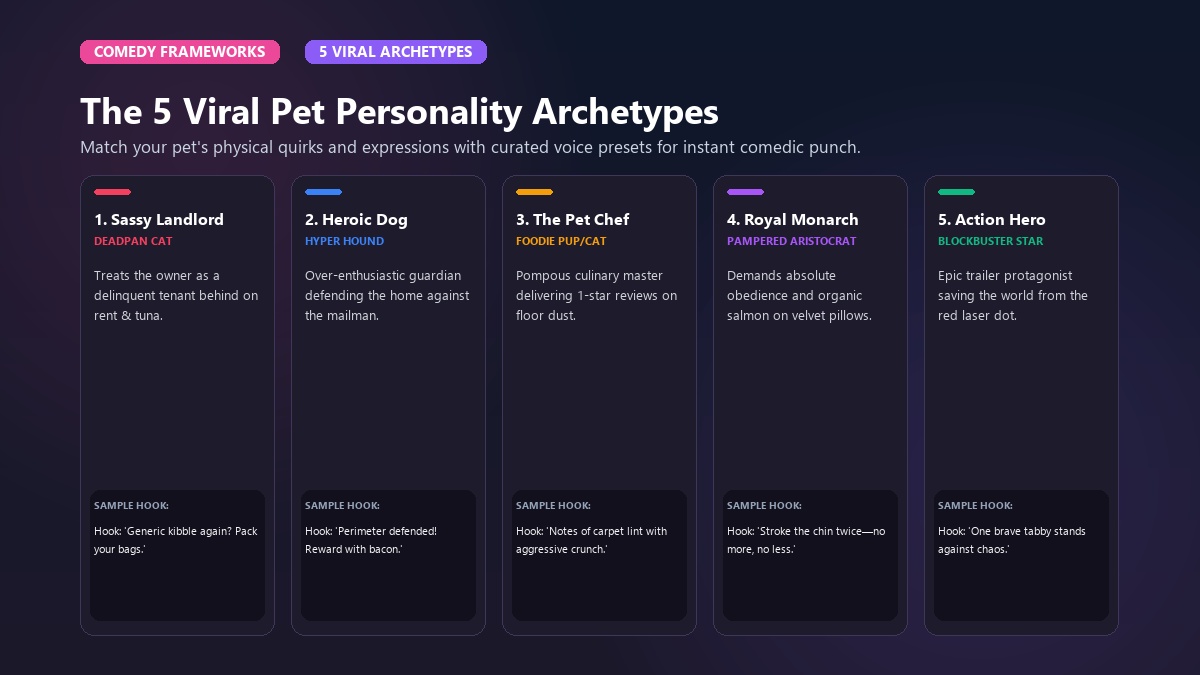
A great pet video isn’t just about moving pixels; it’s about storytelling. When viewers scroll through TikTok or Instagram Reels, they stop when they recognize a relatable dynamic between a pet and their human. Matching your pet’s physical quirks with the right comedic archetype makes your content instantly memorable.
Here are five proven personality frameworks you can create in seconds using curated templates:
                      ┌───────────────────────────────┐
                      │  5 Viral Pet Archetypes       │
                      └──────────────┬────────────────┘
                                     │
         ┌──────────────┬────────────┼────────────┬──────────────┐
         ▼              ▼            ▼            ▼              ▼
   [The Sassy     [The Dramatic  [The Pet     [The Royal    [The Action
    Landlord]      Heroic Dog]    Chef]        Monarch]      Trailer]
   (Deadpan Cat)  (Hyper Hound)  (Foodie Pup) (Pampered)    (Epic Hero)
1. The Sassy Landlord (Feline Boss)
- Best For: Cats with flat ears, half-closed eyes, or a resting unimpressed expression.
- Voice Preset: Sassy or Deadpan British.
- Template Match: ai cat video generator.
- Sample Hook: "I notice you slept past 6:00 AM today. We discussed this in your performance review. The dry food in my bowl is oxidized, and frankly, your work ethic is slipping."
- Why It Works: Highlights the universal dynamic of cats treating their humans as humble domestic staff.
2. The Over-Enthusiastic Defender (Heroic Dog)
- Best For: Dogs with wide, alert eyes, perked ears, or an open, smiling jaw.
- Voice Preset: High-Energy Funny or Dramatic.
- Template Match: animate dog photo.
- Sample Hook: "Attention household! The postal worker has approached the perimeter. I have deployed aggressive barking maneuvers. You are safe. You may reward my heroism with bacon."
- Why It Works: Taps into the pure, unfiltered enthusiasm that makes canine content universally beloved.
3. The Culinary Critic (Pet Chef)
- Best For: Dogs or cats caught sniffing the dinner table, licking their chops, or staring at treats.
- Voice Preset: Gourmet French or Dramatic Italian.
- Template Match: Pet Chef (Character Transformation).
- Visual Style: Renders a miniature chef hat and kitchen background while preserving the pet’s real face.
- Sample Hook: "A delicate kibble medley aged precisely four hours in an open ceramic bowl. Notes of chicken meal with an aggressive floor-dust finish. Three stars."
4. The Royal Monarch (Pampered Aristocrat)
- Best For: Long-haired breeds, Persians, Poodles, or pets lounging across velvet cushions.
- Voice Preset: Royal / Aristocratic.
- Template Match: Cartoon Adventure / Character Transformation.
- Sample Hook: "You may approach the throne. Stroke the chin twice—no more, no less—and present the organic salmon paste."
5. The Blockbuster Action Hero
- Best For: High-energy pets caught mid-stride, jumping, or wearing a determined look.
- Voice Preset: Hollywood Trailer Voiceover.
- Template Match: Pet Movie Trailer & Pet Superhero.
- Sample Hook: "In a world overrun by the red laser dot... one brave tabby stands between order and total chaos. Coming this summer: Whiskers of Fury."
To see how short-form audio synchronization elevates these character archetypes on social feeds, explore this helpful tutorial breakdown:
<iframe width="560" height="315" src="https://www.youtube.com/embed/dog_talking_ai_tutorial" title="How AI Brings Pet Photos to Life" frameborder="0" allow="accelerometer; autoplay; clipboard-write; encrypted-media; gyroscope; picture-in-picture" allowfullscreen></iframe>Step-by-Step: How to Turn Any Pet Photo into an Animated Video in 3 Easy Steps
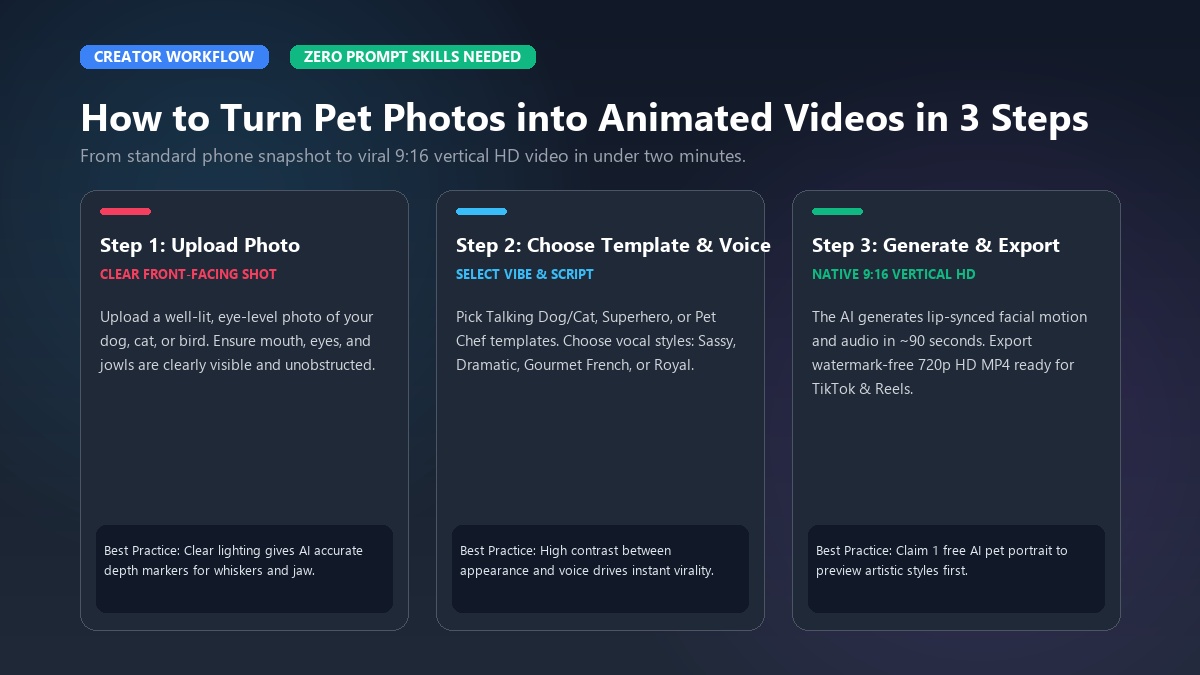
Creating a high-definition pet video requires no graphic design skills or prompt engineering. Follow this simple 3-step workflow:
[ Step 1: Upload Photo ]  ──▶  [ Step 2: Pick Template & Voice ]  ──▶  [ Step 3: Export 9:16 Video ]
 (Clear front-facing shot)      (Talking Pet, Hero, Chef, Trailer)      (Ready for TikTok & Reels)
Step 1: Upload a Clear, Front-Facing Photo
Select an image where your pet’s face is unobstructed and well-lit. Good lighting ensures the AI accurately detects eye contours, whisker pads, and jaw lines.
- Avoid blurry shots or photos where hands or collars cover the chin.
- Both dogs and cats produce exceptional results; even birds, rabbits, and horses can be animated.
Step 2: Choose Your Template and Personality Voice
Navigate to the Animate My Pet template catalog and pick the concept that matches your vision:
- Select Talking Dog or Talking Cat for dialogue-driven skits.
- Choose Pet Superhero, Pet Chef, Pet Rockstar, or Pet Goes To Space for costume transformations.
- Pick your preferred voice style: Cute, Funny, Dramatic, Sassy, or Royal.
Step 3: Generate and Export in 9:16 Vertical HD
Click generate. In approximately 60 to 90 seconds, the cloud pipeline renders a crisp 10-second vertical MP4 video (720p HD) formatted specifically for TikTok, Instagram Reels, and YouTube Shorts. Paid credit packs export 100% watermark-free, ready for immediate publishing.
Before purchasing a pack, new users can claim 1 free AI pet portrait to preview the artistic transformation before animating.
             ┌───────────────────────────────────────────────┐
             │       Memorial Keepsake Case Study            │
             └───────────────────────┬───────────────────────┘
                                     │
    David lost his senior golden retriever, Buster, after 14 years.
    He uploaded a favorite snapshot from their final lake camping trip.
    Within 90 seconds, the AI animated Buster softly tilting his head,
    blinking warmly in the sunlight with a gentle tail wag.
    The resulting keepsake became a cherished family video memory.
David, a teacher from Denver, experienced this firsthand when remembering his golden retriever, Buster. He uploaded an older photograph from a camping trip. Rather than creating a comedic skit, he used a subtle animation preset. Seeing Buster blink, perk his ears, and tilt his head with his signature gentle smile provided emotional comfort that static prints couldn't match.
Creative Photo Tips: How to Capture Maximum Personality from the Start
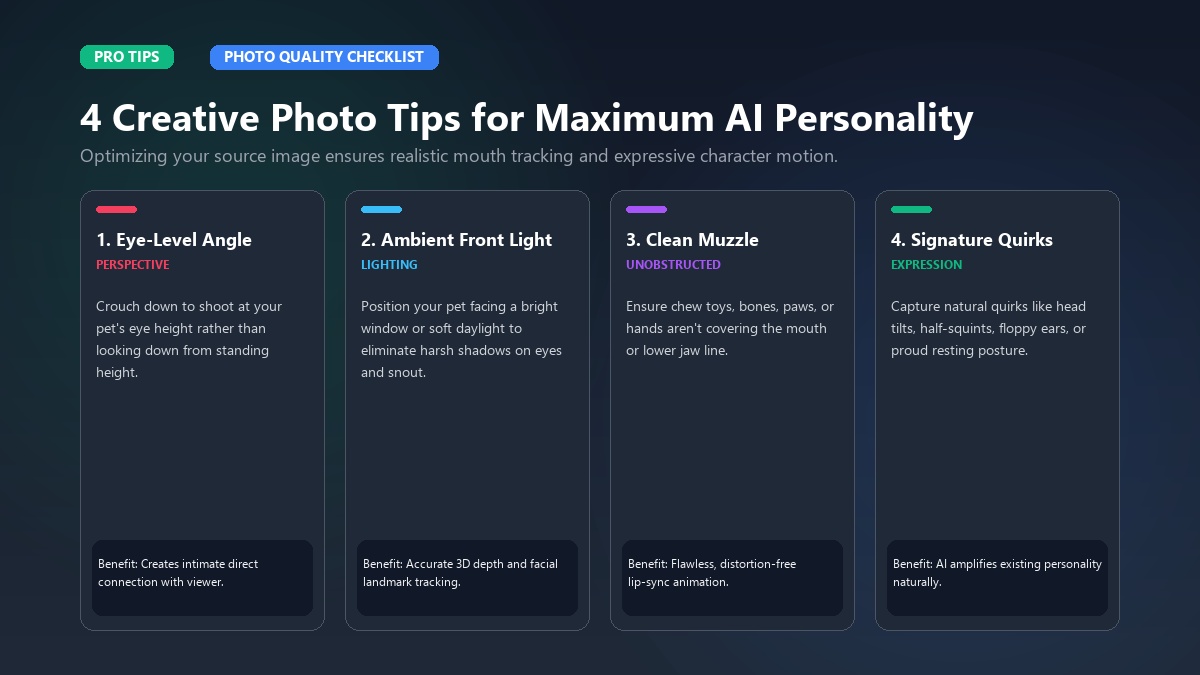
The quality of your source photo directly influences the emotional depth of your final animation. Keep these four practical rules in mind before uploading:
   ┌─────────────────────────────────────────────────────────────┐
   │             Photo Quality Checklist for AI Animation         │
   ├─────────────────────────────────────────────────────────────┤
   │ [✔] Eye-Level Perspective: Shoot at your pet's eye height    │
   │ [✔] Natural Ambient Lighting: Avoid harsh backlighting/flash │
   │ [✔] Clear Mouth & Chin: Ensure no chew toys or paws obscure  │
   │ [✔] High Contrast Background: Distinguishes fur edges        │
   └─────────────────────────────────────────────────────────────┘
1. Get Down to Eye Level
Don't take downward photos from standing height. Shooting at your pet’s eye level establishes an intimate, engaging perspective that draws viewers into the video immediately.
2. Prioritize Ambient, Front-Facing Light
Harsh overhead lighting or dark shadows around the eyes can cause the computer vision model to miscalculate eye depth. Position your pet facing a window or in soft, indirect outdoor daylight.
3. Keep the Muzzle Clean and Unobstructed
Ensure your pet isn't holding a ball, chew toy, or bone in their mouth. A neutral or softly closed mouth provides the cleanest baseline geometry for lip-sync animation.
4. Highlight Their Signature Expression
Does your cat have a signature skeptical squint? Does your dog have one floppy ear? Choose photos that already hint at their quirky character. The AI amplifies existing facial geometry, turning natural quirks into cinematic moments.
To review available generation options and pack sizes, visit Animate My Pet pricing to find the ideal tier for your creative needs.
Frequently Asked Questions
How does AI turn a single pet photo into a talking video?
AI analyzes your pet's facial structure using computer vision landmarks to identify eyes, ears, and snout geometry. It then generates natural micro-movements (blinking, head tilting) and synchronizes the lower jaw and lips with a selected voice preset, producing a fluid 10-second vertical video.
Do I need to write complex AI prompts to give my pet a personality?
No. Animate My Pet operates on a zero-prompt template system. You simply upload a photo, choose a curated character style (such as Pet Superhero, Pet Chef, or Talking Cat), and select a voice style without writing any code or prompt strings.
Why do general AI video generators give pets human teeth or extra paws?
General models are trained predominantly on human datasets. When asked to animate speech, they often map human facial mechanics onto animal muzzles. Dedicated pet AI uses animal-specific meshes that maintain correct snout proportions and natural oral anatomy.
What kind of pet photo gives the best video generation results?
The best results come from clear, well-lit, front-facing photos taken at your pet's eye level. Make sure your pet's mouth and eyes are not covered by toys, paws, or heavy shadows, and use a contrasting background.
Can I use AI pet videos commercially on TikTok, Instagram, and YouTube?
Yes. Videos generated through paid credit packs are 100% watermark-free and fully owned by you. You can post them directly to TikTok, Instagram Reels, YouTube Shorts, or use them in commercial social media campaigns.
How much does it cost to create animated pet videos?
Animate My Pet offers flexible one-time credit packs starting at $9.99 for the Starter Pack (3 videos + 5 portraits) and $24.99 for the Creator Pack (10 videos + 15 portraits). There are no recurring monthly subscriptions, and new users can claim a free AI pet portrait.
Conclusion
Bringing your pet’s personality to life is no longer reserved for Hollywood visual effects studios or seasoned video editors. Whether you want to delight your followers with a viral talking cat monologue, celebrate your dog as a culinary masterchef, or preserve a moving keepsake of a cherished family companion, modern zero-prompt AI makes the entire process effortless.
To get started this week:
- Snap a bright, eye-level photo of your dog or cat.
- Decide on their true personality archetype (Sassy, Heroic, Royal, or Dramatic).
- Upload your photo and watch their unique character come alive in seconds.
Ready to see what your pet has to say? Visit Animate My Pet to create your video or generate a free cute cat AI portrait today.